---
title: What is the State Compliance by Bond Report?
description: "This article covers: A wine's tax class determines how much excise tax is paid per gallon of wine as defined by the percentage of alcohol in the wine. In the United States, tax classes for still wines"
---
[Skip to content](https://support.innovint.us/hc/en-us/what-is-the-state-compliance-by-bond-report#main-content)
[Submit a help ticket](https://support.innovint.us/hc/en-us/kb-tickets/new?hsLang=en)
![InnoVintSupportCenter - header.png\]](https://support.innovint.us/hs-fs/hubfs/InnoVintSupportCenter%20-%20header.png?width=300&height=22&name=InnoVintSupportCenter%20-%20header.png)
Open main navigation
Close main navigation
- [Submit a help ticket](https://support.innovint.us/hc/en-us/kb-tickets/new)
How can we help you today?
- There are no suggestions because the search field is empty.
1. [Support Center](https://support.innovint.us/hc/en-us?hsLang=en)
2. [MAKE](https://support.innovint.us/hc/en-us/make?hsLang=en)
3. [Compliance](https://support.innovint.us/hc/en-us/make?hsLang=en#compliance)
# What is the State Compliance by Bond Report?
This article covers:
- [Who should use the State Compliance by Bond Report?](https://support.innovint.us/hc/en-us/what-is-the-state-compliance-by-bond-report#who)
- [What does the report do?](https://support.innovint.us/hc/en-us/what-is-the-state-compliance-by-bond-report#what)
- [How to use the report & things to note](https://support.innovint.us/hc/en-us/what-is-the-state-compliance-by-bond-report#how)
- [FAQ](https://support.innovint.us/hc/en-us/what-is-the-state-compliance-by-bond-report#FAQ)
### Who should use the State Compliance by Bond Report?
A wine's tax class determines how much excise tax is paid per gallon of wine as defined by the percentage of alcohol in the wine. In the United States, tax classes for still wines are set at both the federal and state levels.
Historically, federal still wine tax classes were determined as above or below 14% alcohol by volume (ABV). But in the Tax Cuts and Jobs Act of 2017, the Federal still wine tax classes were amended and now require producers to declare wine above and below 16% ABV.
In response to the change, InnoVint updated still wine tax classes to \<16% and 16-21% ABV. However, several states in the US have continued to determine their still wine tax classes as above or below 14% ABV.
For our users in those states using the 14% threshold (which include California, Nevada and Wisconsin among others), we have provided this report to help wineries more efficiently classify their wines for state reporting.
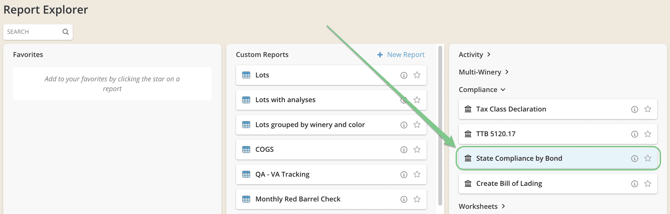
You can find the **State Compliance by Bond** report in the Compliance section of the Report Explorer.
### What does the report do?
This new report leverages our powerful custom reporting technology, in conjunction with two new columns:
- **Relevant Alcohol (EtOH & Alcohol) - REL ALC**
This column evaluates the *most recently entered* analysis from the following columns and displays that most recent value for a lot:
- Alcohol
- Ethanol
- Ethanol at 60F
- Ethanol at 20C
This may be *either* a lot composite or an Individual vessel type analysis. Find the analysis type referenced in the REL ALC "Performed on" column. The report will automatically display the Value, Effective At and Performed On columns by default.
- **State Alcohol Category - ALC CAT**
This column takes the Relevant Alcohol (EtOH & Alcohol) value of the lot and assigns an alcohol category based on that value: \<14%, 14-16%, \>16% or No value.
The Compliance by Bond report (which is also a multi-winery report) automatically groups wines by **Bond**, and then by **State Alcohol Category**, thereby providing a quick method to report on wines by State tax class:
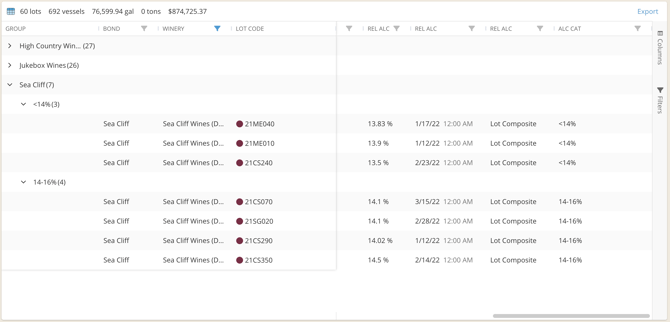
You can also find these new Relevant Alcohol and State Alcohol Category columns available for any other custom reports that you might create!
### How to use the report & things to note
#### Timing
- This report is NOT a point in time report, so you cannot run it as of a specific point in time (i.e. January 31).
We suggest that your team internally confirm a time for monthly/ quarterly/annual close (i.e. when you would normally would set a [lock backdate](https://support.innovint.us/hc/en-us/articles/360020396351-winery-activity-lock-backdating?hsLang=en) and stop entering actions for the period), and to set a reminder to export a report as a snapshot of that date and time.
#### Results & Analysis Types
- If a lot does not have any relevant alcohol readings, it will be grouped under the **No value** heading. These may be undeclared wines, or they may be wines missing alcohol results. Expand the **No value** group to review lots and assess their stage or status (*consider adding the lot stage column for a quick check*).
- If you do update analysis on a lot, be sure to wait for the report to refresh in order to display that data.
- If your team utilizes Individual Vessel analyses frequently, especially on barrel lots, be sure to check the **Performed on** column, in order to confirm that the desired analysis type is being pulled for the report.
#### Custom Report functionality
- You may move, add, remove, filter and sort columns in the report to view the data as required. See more about all the potential functionality [here](https://support.innovint.us/hc/en-us/custom-reports?hsLang=en)! *However*, you may not re-save the State Compliance by Bond report as a new report, edit the name or description, or revert to the saved version of the report.
- This report can be exported as an .xlsx file with all groupings and customized columns intact.
- Don't forget, just like any Custom Report, you can add this report to your Favorites.
Keep an eye on the report throughout your reporting period to be sure analysis is being entered in a timely manner.
### FAQ
**Q: How are the alcohol groupings determined?**
*A: The State Alcohol Category is determined as follows:*
- *\<14 % - Relevant Alcohol value is less than 14.00%*
- *14 - 16 % - Relevant Alcohol value is between 14.00% and up to and including 16.00%*
- *\> 16 % - Relevant Alcohol value is greater than 16.00%*
- *No value - No value exists for Relevant Alcohol. This means that no values exist for this lot in the following analyses:*
*Alcohol, Ethanol, Ethanol at 60F, Ethanol at 20C*
- [New to InnoVint](https://support.innovint.us/hc/en-us/new-to-innovint?hsLang=en#main-content)
- [Accessing InnoVint](https://support.innovint.us/hc/en-us/new-to-innovint?hsLang=en#accessing-innovint)
- [Settings - MAKE, GROW & FINANCE](https://support.innovint.us/hc/en-us/new-to-innovint?hsLang=en#settings-make-grow-finance)
- [Getting Started - MAKE, GROW & FINANCE](https://support.innovint.us/hc/en-us/new-to-innovint?hsLang=en#getting-started-make-grow-finance)
- [MAKE](https://support.innovint.us/hc/en-us/make?hsLang=en#main-content)
- [Dashboard & Calendar](https://support.innovint.us/hc/en-us/make?hsLang=en#dashboard-calendar)
- [Lots](https://support.innovint.us/hc/en-us/make?hsLang=en#lots)
- [Vessels](https://support.innovint.us/hc/en-us/make?hsLang=en#vessels)
- [Work Orders](https://support.innovint.us/hc/en-us/make?hsLang=en#work-orders)
- [Recording Actions](https://support.innovint.us/hc/en-us/make?hsLang=en#recording-actions)
- [Movement Actions](https://support.innovint.us/hc/en-us/make?hsLang=en#movement-actions)
- [Topping](https://support.innovint.us/hc/en-us/make?hsLang=en#topping)
- [Analysis](https://support.innovint.us/hc/en-us/make?hsLang=en#analysis)
- [Analysis Reports](https://support.innovint.us/hc/en-us/make?hsLang=en#analysis-reports)
- [Additions](https://support.innovint.us/hc/en-us/make?hsLang=en#additions)
- [Case Goods in MAKE](https://support.innovint.us/hc/en-us/make?hsLang=en#case-goods-in-make)
- [Dry Goods](https://support.innovint.us/hc/en-us/make?hsLang=en#dry-goods)
- [Vineyards](https://support.innovint.us/hc/en-us/make?hsLang=en#vineyards)
- [Reporting](https://support.innovint.us/hc/en-us/make?hsLang=en#reporting)
- [Compliance](https://support.innovint.us/hc/en-us/make?hsLang=en#compliance)
- [Tags & Notes](https://support.innovint.us/hc/en-us/make?hsLang=en#tags-notes)
- [Printing Labels from InnoVint](https://support.innovint.us/hc/en-us/make?hsLang=en#printing-labels-from-innovint)
- [AI](https://support.innovint.us/hc/en-us/make?hsLang=en#ai)
- [GROW](https://support.innovint.us/hc/en-us/grow?hsLang=en)
- [FINANCE](https://support.innovint.us/hc/en-us/finance?hsLang=en#main-content)
- [Getting Started](https://support.innovint.us/hc/en-us/finance?hsLang=en#getting-started)
- [Reporting](https://support.innovint.us/hc/en-us/finance?hsLang=en#reporting)
- [Guidance & FAQ](https://support.innovint.us/hc/en-us/finance?hsLang=en#guidance-faq)
- [Harvest](https://support.innovint.us/hc/en-us/harvest?hsLang=en#main-content)
- [Preparing for Harvest](https://support.innovint.us/hc/en-us/harvest?hsLang=en#preparing-for-harvest)
- [Vineyard Harvest Reports](https://support.innovint.us/hc/en-us/harvest?hsLang=en#vineyard-harvest-reports)
- [Harvest Workflow & Fermentation Tracking](https://support.innovint.us/hc/en-us/harvest?hsLang=en#harvest-workflow-fermentation-tracking)
- [Settings & Preferences](https://support.innovint.us/hc/en-us/harvest?hsLang=en#settings-preferences)
- [MAKE: Advanced Features](https://support.innovint.us/hc/en-us/make-advanced-features?hsLang=en#main-content)
- [Owner-based Permissions System](https://support.innovint.us/hc/en-us/make-advanced-features?hsLang=en#owner-based-permissions-system)
- [Custom Attributes](https://support.innovint.us/hc/en-us/make-advanced-features?hsLang=en#custom-attributes)
- [Blend Trials](https://support.innovint.us/hc/en-us/make-advanced-features?hsLang=en#blend-trials)
- [Tank Maps](https://support.innovint.us/hc/en-us/make-advanced-features?hsLang=en#tank-maps)
- [Sparkling Wine Module](https://support.innovint.us/hc/en-us/make-advanced-features?hsLang=en#sparkling-wine-module)
- [Intended Use](https://support.innovint.us/hc/en-us/make-advanced-features?hsLang=en#intended-use)
- [Integrations](https://support.innovint.us/hc/en-us/make-advanced-features?hsLang=en#integrations)
- [SUPPLY](https://support.innovint.us/hc/en-us/supply?hsLang=en#main-content)
- [Getting Started with SUPPLY](https://support.innovint.us/hc/en-us/supply?hsLang=en#getting-started-with-supply)
- [Actions in SUPPLY](https://support.innovint.us/hc/en-us/supply?hsLang=en#actions-in-supply)
- [Using SUPPLY](https://support.innovint.us/hc/en-us/supply?hsLang=en#using-supply)
- [Order Management](https://support.innovint.us/hc/en-us/supply?hsLang=en#order-management)
- [InnoApp](https://support.innovint.us/hc/en-us/innoapp?hsLang=en#main-content)
- [InnoApp](https://support.innovint.us/hc/en-us/innoapp?hsLang=en#innoapp)
- [InnoApp - Work Orders](https://support.innovint.us/hc/en-us/innoapp?hsLang=en#innoapp-work-orders)
- [Guidance & FAQs](https://support.innovint.us/hc/en-us/guidance-faqs?hsLang=en#main-content)
- [Frequently Asked Questions](https://support.innovint.us/hc/en-us/guidance-faqs?hsLang=en#frequently-asked-questions)
- [Specialized Workflows](https://support.innovint.us/hc/en-us/guidance-faqs?hsLang=en#specialized-workflows)
- [Best Practices](https://support.innovint.us/hc/en-us/guidance-faqs?hsLang=en#best-practices)
- [Templates](https://support.innovint.us/hc/en-us/guidance-faqs?hsLang=en#templates)
- [InnoVint Academy](https://support.innovint.us/hc/en-us/innovint-academy?hsLang=en#main-content)
- [Video Trainings/Tutorials](https://support.innovint.us/hc/en-us/innovint-academy?hsLang=en#video-trainings-tutorials)
- [Video Informational Sessions](https://support.innovint.us/hc/en-us/innovint-academy?hsLang=en#video-informational-sessions)
- [Quick Video Tutorials](https://support.innovint.us/hc/en-us/innovint-academy?hsLang=en#quick-video-tutorials)
- [Product Updates](https://support.innovint.us/hc/en-us/product-updates?hsLang=en#main-content)
- [Product Updates: 2025-2026](https://support.innovint.us/hc/en-us/product-updates?hsLang=en#product-updates-2025-2026)
- [Product Updates: 2024](https://support.innovint.us/hc/en-us/product-updates?hsLang=en#product-updates-2024)
- [Product Updates: 2023](https://support.innovint.us/hc/en-us/product-updates?hsLang=en#product-updates-2023)
- [Product Updates: 2017 - 2022](https://support.innovint.us/hc/en-us/product-updates?hsLang=en#product-updates-2017-2022)
- [Support Hours & FAQs](https://support.innovint.us/hc/en-us/support-hours-faqs?hsLang=en)
[](https://support.innovint.us/hc/en-us?hsLang=en)
Copyright © 2025, InnoVint