---
title: "InnoApp: Vineyard"
description: "This article covers: Mobile App: Vineyard Explorer Mobile App: Vineyard Details Mobile App: Block Details Mobile App: Vineyard Actions The Mobile App's Vineyard Explorer is the entry point for findin"
---
[Skip to content](https://support.innovint.us/hc/en-us/vineyard-mobile-app#main-content)
[Submit a help ticket](https://support.innovint.us/hc/en-us/kb-tickets/new?hsLang=en)
![InnoVintSupportCenter - header.png\]](https://support.innovint.us/hs-fs/hubfs/InnoVintSupportCenter%20-%20header.png?width=300&height=22&name=InnoVintSupportCenter%20-%20header.png)
Open main navigation
Close main navigation
- [Submit a help ticket](https://support.innovint.us/hc/en-us/kb-tickets/new)
How can we help you today?
- There are no suggestions because the search field is empty.
1. [Support Center](https://support.innovint.us/hc/en-us?hsLang=en)
2. [InnoApp](https://support.innovint.us/hc/en-us/innoapp?hsLang=en)
3. [InnoApp](https://support.innovint.us/hc/en-us/innoapp?hsLang=en#innoapp)
# InnoApp: Vineyard
This article covers:
[InnoApp: Vineyard Explorer](https://support.innovint.us/hc/en-us/vineyard-mobile-app#explorer)
[InnoApp: Vineyard Details ](https://support.innovint.us/hc/en-us/vineyard-mobile-app#details)
[InnoApp: Block Details](https://support.innovint.us/hc/en-us/vineyard-mobile-app#block)
[InnoApp: Vineyard Actions](https://support.innovint.us/hc/en-us/vineyard-mobile-app#actions)
#### InnoApp: Vineyard Explorer
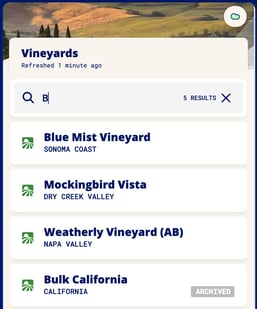
InnoApp's Vineyard Explorer is the entry point for finding and recording data on the vineyards and blocks you have in the system. The vineyards display in alpha/numeric order for scrolling.
The Vineyard Explorer shows each vineyard and its appellation in the main view, including archived vineyards (sorted at the bottom). The search field works on any text string.
#### InnoApp: Vineyard Details
Select any Vineyard via the Vineyard Explorer, and you are taken to the Vineyard Details page. This shows a summary of your vineyard attributes, including:
Appellation, Address, Grower, number of Blocks, total block area, number of varietals, tags, owner tags, and notes.
Below the summary, there are sections to view and access your Blocks, Events (across all blocks), and Notes.
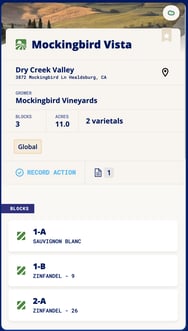 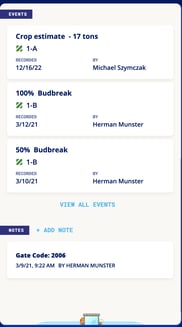
By updating the vineyard address in the main desktop app, you'll see a map pin appear in InnoApp - click here and link straight to Google maps for directions! If you have a hard-to-find vineyard, this works with GPS coordinates too!

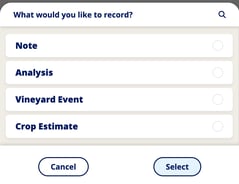
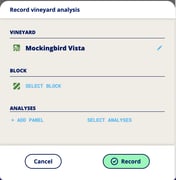
You can also **Record Actions** from the Vineyard Details page. This action link autofills any action with the vineyard, and requires you to select the block:
#### InnoApp: Block Details
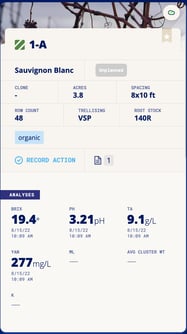
From the Vineyard Details page, click into any Block to access the Block Details page. This page shows a summary of your individual block attributes, including:
Variety, Harvest Status flag (*Unplanned, Forecast, Scheduled, Received, Received Partial* - for the **current** harvest year), Clone, Area, Vine Spacing, Row Count, Trellising, Rootstock, and tags and notes.
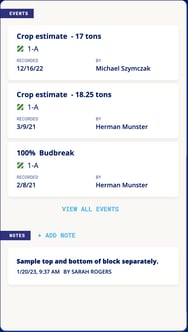
Below the summary, there are sections to view your Block Analyses (most recent analysis only), Block Events, and Notes.
. 
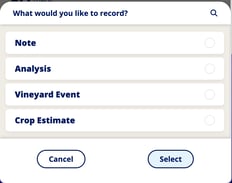
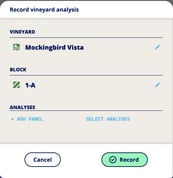
**Record Actions** on the block via the block detail page - this autofills any selected action with the vineyard/block details:
. 
#### InnoApp: Vineyard Actions
What actions can I perform on the Vineyard via InnoApp?
**Add Note**, **Analysis**, **Vineyard Event** and **Crop Estimate** are all accessible via the Record Action button in both the Vineyard and Block Detail pages. Analysis, Vineyard Events and Crop Estimates are all applied at the Block level. A Note is applied to the Vineyard **OR** to the Block, depending on where you access the Record Action button.
Find more detailed information on recording Vineyard Events & Crop Estimates [here](https://support.innovint.us/hc/en-us/mobile-app-how-to-enter-vineyard-events-and-crop-estimates?hsLang=en).
Don't forget! All of this data can be recorded while offline, and it will update in the cloud once you are back in range.
**Add Notes:**
Add new notes and photos to your vineyards and blocks using the Record Action button. If you access the Notes action from the Vineyard Details page, you are recording a Note on that Vineyard. If you access it from the Block Details page, you record the Note on the Block where you accessed the action.
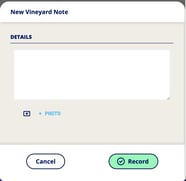
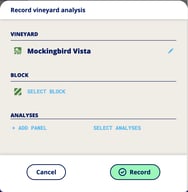
**Record Analysis:**
Add new analysis to Blocks using your pre-existing analysis panels, or select ad hoc analysis here. Block must be selected. Find out more about entering Vineyard Analysis [here.](https://support.innovint.us/hc/en-us/mobile-app-how-to-record-analysis?hsLang=en#vineyard_analysis)
**Record Vineyard Events:**
Scouting? Record phenological data, application events or visual observations here. There must be a Block selected.
- Phenological data: Track progress of Germination of Cover Crop, Budbreak, Bloom, Fruit Set, Hard Seed and Veraison via percentage.
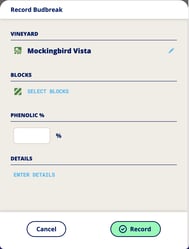
- Application tracking: record events including Irrigation, Spraying, Pruning, Thinning, Training, Additions/Treatments, Cover crop/Weed control and Fruit Drop on a qualitative basis. Include as much information as you need in the "Details" field.
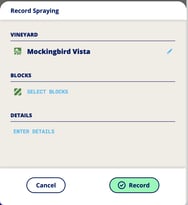
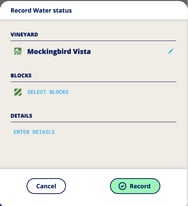
- Visual Observation: Record additional observations with the event types: Water status, Nutrient status, Soil conditions, Pest monitoring, and Disease monitoring.
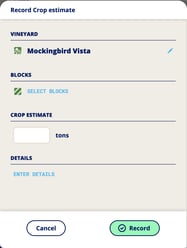
**Record Crop Estimates:**
Do you have that number ready? Put it in while you're on the go. This is applied at the Block level, and a Block must be selected.
NOTE: InnoApp does not support backdating actions. If you need to enter backdated actions, please use the main desktop/browser application. Check out our article on [How to Record and Track Vineyard Data](https://support.innovint.us/hc/en-us/articles/360026806092-how-to-record-and-track-data-and-analyses-on-vineyard-blocks?hsLang=en) in the full desktop browser, and our other options for recording vineyard data, including [imports](https://support.innovint.us/hc/en-us/how-to-import-vineyard-events-via-csv-file?hsLang=en)!
- [New to InnoVint](https://support.innovint.us/hc/en-us/new-to-innovint?hsLang=en#main-content)
- [Accessing InnoVint](https://support.innovint.us/hc/en-us/new-to-innovint?hsLang=en#accessing-innovint)
- [Settings - MAKE, GROW & FINANCE](https://support.innovint.us/hc/en-us/new-to-innovint?hsLang=en#settings-make-grow-finance)
- [Getting Started - MAKE, GROW & FINANCE](https://support.innovint.us/hc/en-us/new-to-innovint?hsLang=en#getting-started-make-grow-finance)
- [MAKE](https://support.innovint.us/hc/en-us/make?hsLang=en#main-content)
- [Dashboard & Calendar](https://support.innovint.us/hc/en-us/make?hsLang=en#dashboard-calendar)
- [Lots](https://support.innovint.us/hc/en-us/make?hsLang=en#lots)
- [Vessels](https://support.innovint.us/hc/en-us/make?hsLang=en#vessels)
- [Work Orders](https://support.innovint.us/hc/en-us/make?hsLang=en#work-orders)
- [Recording Actions](https://support.innovint.us/hc/en-us/make?hsLang=en#recording-actions)
- [Movement Actions](https://support.innovint.us/hc/en-us/make?hsLang=en#movement-actions)
- [Topping](https://support.innovint.us/hc/en-us/make?hsLang=en#topping)
- [Analysis](https://support.innovint.us/hc/en-us/make?hsLang=en#analysis)
- [Analysis Reports](https://support.innovint.us/hc/en-us/make?hsLang=en#analysis-reports)
- [Additions](https://support.innovint.us/hc/en-us/make?hsLang=en#additions)
- [Case Goods in MAKE](https://support.innovint.us/hc/en-us/make?hsLang=en#case-goods-in-make)
- [Dry Goods](https://support.innovint.us/hc/en-us/make?hsLang=en#dry-goods)
- [Vineyards](https://support.innovint.us/hc/en-us/make?hsLang=en#vineyards)
- [Reporting](https://support.innovint.us/hc/en-us/make?hsLang=en#reporting)
- [Compliance](https://support.innovint.us/hc/en-us/make?hsLang=en#compliance)
- [Tags & Notes](https://support.innovint.us/hc/en-us/make?hsLang=en#tags-notes)
- [Printing Labels from InnoVint](https://support.innovint.us/hc/en-us/make?hsLang=en#printing-labels-from-innovint)
- [AI](https://support.innovint.us/hc/en-us/make?hsLang=en#ai)
- [GROW](https://support.innovint.us/hc/en-us/grow?hsLang=en)
- [FINANCE](https://support.innovint.us/hc/en-us/finance?hsLang=en#main-content)
- [Getting Started](https://support.innovint.us/hc/en-us/finance?hsLang=en#getting-started)
- [Reporting](https://support.innovint.us/hc/en-us/finance?hsLang=en#reporting)
- [Guidance & FAQ](https://support.innovint.us/hc/en-us/finance?hsLang=en#guidance-faq)
- [Harvest](https://support.innovint.us/hc/en-us/harvest?hsLang=en#main-content)
- [Preparing for Harvest](https://support.innovint.us/hc/en-us/harvest?hsLang=en#preparing-for-harvest)
- [Vineyard Harvest Reports](https://support.innovint.us/hc/en-us/harvest?hsLang=en#vineyard-harvest-reports)
- [Harvest Workflow & Fermentation Tracking](https://support.innovint.us/hc/en-us/harvest?hsLang=en#harvest-workflow-fermentation-tracking)
- [Settings & Preferences](https://support.innovint.us/hc/en-us/harvest?hsLang=en#settings-preferences)
- [MAKE: Advanced Features](https://support.innovint.us/hc/en-us/make-advanced-features?hsLang=en#main-content)
- [Owner-based Permissions System](https://support.innovint.us/hc/en-us/make-advanced-features?hsLang=en#owner-based-permissions-system)
- [Custom Attributes](https://support.innovint.us/hc/en-us/make-advanced-features?hsLang=en#custom-attributes)
- [Blend Trials](https://support.innovint.us/hc/en-us/make-advanced-features?hsLang=en#blend-trials)
- [Tank Maps](https://support.innovint.us/hc/en-us/make-advanced-features?hsLang=en#tank-maps)
- [Sparkling Wine Module](https://support.innovint.us/hc/en-us/make-advanced-features?hsLang=en#sparkling-wine-module)
- [Intended Use](https://support.innovint.us/hc/en-us/make-advanced-features?hsLang=en#intended-use)
- [Integrations](https://support.innovint.us/hc/en-us/make-advanced-features?hsLang=en#integrations)
- [SUPPLY](https://support.innovint.us/hc/en-us/supply?hsLang=en#main-content)
- [Getting Started with SUPPLY](https://support.innovint.us/hc/en-us/supply?hsLang=en#getting-started-with-supply)
- [Actions in SUPPLY](https://support.innovint.us/hc/en-us/supply?hsLang=en#actions-in-supply)
- [Using SUPPLY](https://support.innovint.us/hc/en-us/supply?hsLang=en#using-supply)
- [Order Management](https://support.innovint.us/hc/en-us/supply?hsLang=en#order-management)
- [InnoApp](https://support.innovint.us/hc/en-us/innoapp?hsLang=en#main-content)
- [InnoApp](https://support.innovint.us/hc/en-us/innoapp?hsLang=en#innoapp)
- [InnoApp - Work Orders](https://support.innovint.us/hc/en-us/innoapp?hsLang=en#innoapp-work-orders)
- [Guidance & FAQs](https://support.innovint.us/hc/en-us/guidance-faqs?hsLang=en#main-content)
- [Frequently Asked Questions](https://support.innovint.us/hc/en-us/guidance-faqs?hsLang=en#frequently-asked-questions)
- [Specialized Workflows](https://support.innovint.us/hc/en-us/guidance-faqs?hsLang=en#specialized-workflows)
- [Best Practices](https://support.innovint.us/hc/en-us/guidance-faqs?hsLang=en#best-practices)
- [Templates](https://support.innovint.us/hc/en-us/guidance-faqs?hsLang=en#templates)
- [InnoVint Academy](https://support.innovint.us/hc/en-us/innovint-academy?hsLang=en#main-content)
- [Video Trainings/Tutorials](https://support.innovint.us/hc/en-us/innovint-academy?hsLang=en#video-trainings-tutorials)
- [Video Informational Sessions](https://support.innovint.us/hc/en-us/innovint-academy?hsLang=en#video-informational-sessions)
- [Quick Video Tutorials](https://support.innovint.us/hc/en-us/innovint-academy?hsLang=en#quick-video-tutorials)
- [Product Updates](https://support.innovint.us/hc/en-us/product-updates?hsLang=en#main-content)
- [Product Updates: 2025-2026](https://support.innovint.us/hc/en-us/product-updates?hsLang=en#product-updates-2025-2026)
- [Product Updates: 2024](https://support.innovint.us/hc/en-us/product-updates?hsLang=en#product-updates-2024)
- [Product Updates: 2023](https://support.innovint.us/hc/en-us/product-updates?hsLang=en#product-updates-2023)
- [Product Updates: 2017 - 2022](https://support.innovint.us/hc/en-us/product-updates?hsLang=en#product-updates-2017-2022)
- [Support Hours & FAQs](https://support.innovint.us/hc/en-us/support-hours-faqs?hsLang=en)
[](https://support.innovint.us/hc/en-us?hsLang=en)
Copyright © 2025, InnoVint