---
title: "InnoApp: How to update Vessel Location"
description: The mobile app's quick, continuous scanning function makes it a great tool for updating or clearing your vessel locations. Need to find out more about how InnoVint helps you manage Vessel Locations? C
---
[Skip to content](https://support.innovint.us/hc/en-us/mobile-app-how-to-update-vessel-location#main-content)
[Submit a help ticket](https://support.innovint.us/hc/en-us/kb-tickets/new?hsLang=en)
![InnoVintSupportCenter - header.png\]](https://support.innovint.us/hs-fs/hubfs/InnoVintSupportCenter%20-%20header.png?width=300&height=22&name=InnoVintSupportCenter%20-%20header.png)
Open main navigation
Close main navigation
- [Submit a help ticket](https://support.innovint.us/hc/en-us/kb-tickets/new)
How can we help you today?
- There are no suggestions because the search field is empty.
1. [Support Center](https://support.innovint.us/hc/en-us?hsLang=en)
2. [InnoApp](https://support.innovint.us/hc/en-us/innoapp?hsLang=en)
3. [InnoApp](https://support.innovint.us/hc/en-us/innoapp?hsLang=en#innoapp)
# InnoApp: How to update Vessel Location
InnoApp's quick, continuous scanning function makes it a great tool for updating or clearing your vessel locations.
Need to find out more about how InnoVint helps you manage Vessel Locations? Check out this [article](https://support.innovint.us/hc/en-us/vessel-location-tracking?hsLang=en) first to get started.
This article covers:
- [How to update a vessel location](https://support.innovint.us/hc/en-us/mobile-app-how-to-update-vessel-location#vessel)
- [How to update vessel locations via work orders](https://support.innovint.us/hc/en-us/mobile-app-how-to-update-vessel-location#WO)
- [How to update vessel locations in bulk](https://support.innovint.us/hc/en-us/mobile-app-how-to-update-vessel-location#update)
- [How to clear vessel locations in bulk](https://support.innovint.us/hc/en-us/mobile-app-how-to-update-vessel-location#clear)
- [FAQ](https://support.innovint.us/hc/en-us/mobile-app-how-to-update-vessel-location#FAQs)
- [Video demo (30s)](https://support.innovint.us/hc/en-us/mobile-app-how-to-update-vessel-location#demo)
### How to update a vessel location
1. Navigate to the Vessel Details page
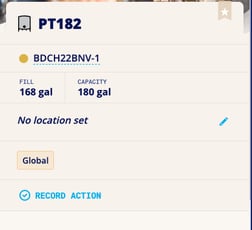
2. Click on the blue pencil next to the location field:
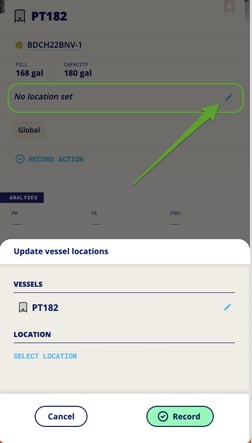
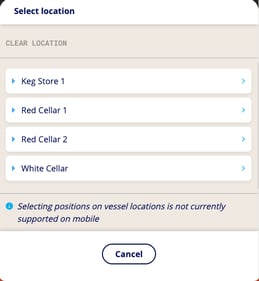
3. Select the location
4. Record location
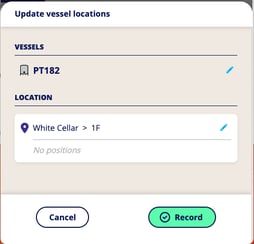
NOTE: InnoApp does not yet support setting a vessel *position*.
### How to update vessel locations via work orders
If you'd like to update the vessel locations for specific vessels utilized within a specific task on a work order, you can easily find and update the locations via the lot/vessels input screen. Tap the three dots to access the **Quick Menu** on the task.
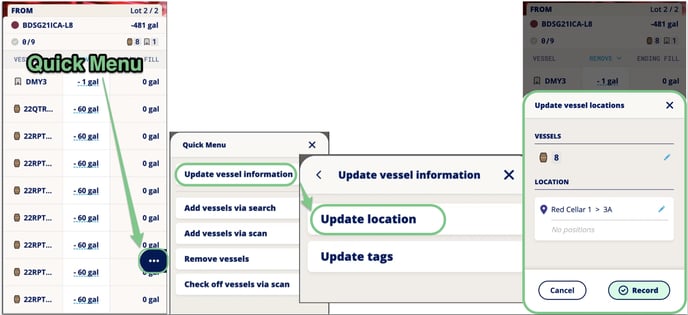
These location changes will be updated as soon as the "Record" button is tapped, regardless of task submission status.
### How to update vessel locations in bulk
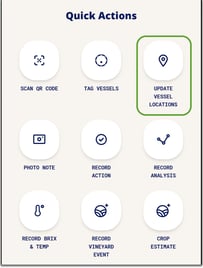
1. Access this function via your Quick Actions menu (scroll towards the bottom of the home page):
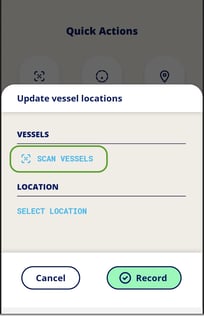
2. Select "**Scan Vessels**" to begin scanning your vessels:
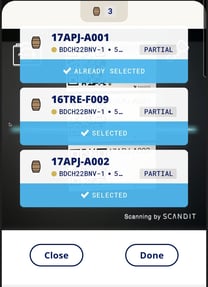
3. You can scan one QR Code after another, continuously. InnoVint will never record a duplicate QR code - you will see "Already Selected" if you scan the same code twice. Click "**Done**" after scanning all barrels:
4. Confirm the total number of vessels and their contents.
- You can continue scanning additional vessels by clicking on "Add More," to the upper right (in blue).
- If you need to start over, click on "Deselect All", at the top right of the screen.
- When you're happy, click on "**Select Vessels**":
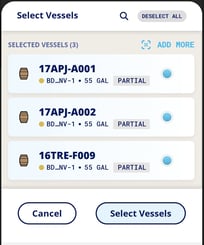
5. Select the new vessel location in a few clicks:
a. 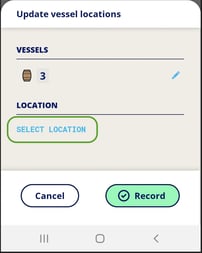 b.  c. 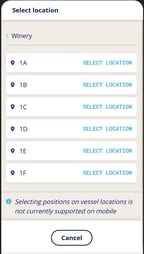
6. Confirm your selections and record!
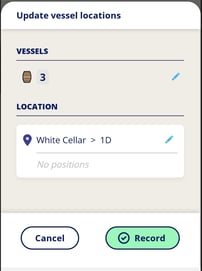
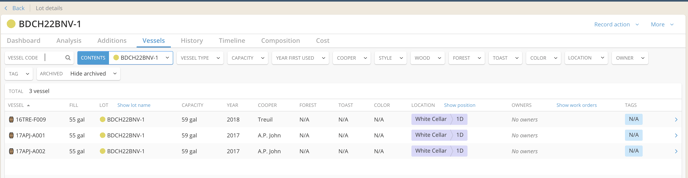
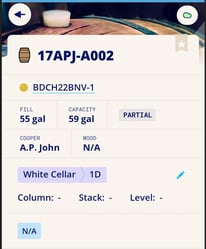
7. View your new vessel locations throughout InnoVint:
*Via Lot Details / Vessels*
*In the Vessel Explorer*

*See the location on an individual vessel in the app*
### How to clear vessel locations in bulk
Follow the steps above through 5b. Instead of selecting a location, click on "Clear Location", and then "Record" to save the update.
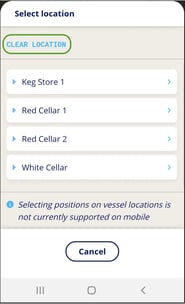 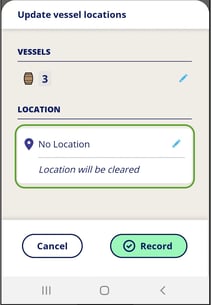
All selected vessels will clear their current locations.
If, for any reason, you want to see the past location of a vessel, you can do that in the Vessel History / Vessel location history.
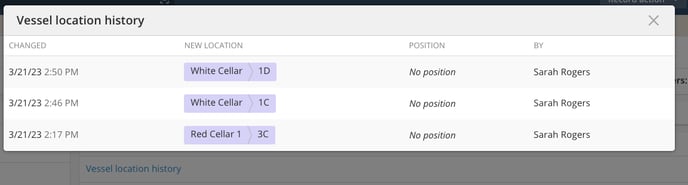Read more [here](https://support.innovint.us/hc/en-us/vessel-location-tracking?hsLang=en#history).
### FAQ
**Q: Can I set the vessel position on the mobile app?**
*A: No, InnoApp currently only allows you to set the location, not a specific position (what you would most likely use to track individual barrels and/or racks). You can set a vessel position in the main desktop browser interface via the individual vessel's details page, or the bulk Manage Vessels menu. Find out how [here](https://support.innovint.us/hc/en-us/vessel-location-tracking?hsLang=en#trackandupdate).*
**Q: Can I update locations offline?**
*A: Yes! InnoApp stores information offline until you are back in range of a signal. Then location data will be uploaded to the cloud, and throughout your InnoVint apps. *
### Video Demo
Check out a quick video demo here (don't worry it's only 25 seconds!).
- [New to InnoVint](https://support.innovint.us/hc/en-us/new-to-innovint?hsLang=en#main-content)
- [Accessing InnoVint](https://support.innovint.us/hc/en-us/new-to-innovint?hsLang=en#accessing-innovint)
- [Settings - MAKE, GROW & FINANCE](https://support.innovint.us/hc/en-us/new-to-innovint?hsLang=en#settings-make-grow-finance)
- [Getting Started - MAKE, GROW & FINANCE](https://support.innovint.us/hc/en-us/new-to-innovint?hsLang=en#getting-started-make-grow-finance)
- [MAKE](https://support.innovint.us/hc/en-us/make?hsLang=en#main-content)
- [Dashboard & Calendar](https://support.innovint.us/hc/en-us/make?hsLang=en#dashboard-calendar)
- [Lots](https://support.innovint.us/hc/en-us/make?hsLang=en#lots)
- [Vessels](https://support.innovint.us/hc/en-us/make?hsLang=en#vessels)
- [Work Orders](https://support.innovint.us/hc/en-us/make?hsLang=en#work-orders)
- [Recording Actions](https://support.innovint.us/hc/en-us/make?hsLang=en#recording-actions)
- [Movement Actions](https://support.innovint.us/hc/en-us/make?hsLang=en#movement-actions)
- [Topping](https://support.innovint.us/hc/en-us/make?hsLang=en#topping)
- [Analysis](https://support.innovint.us/hc/en-us/make?hsLang=en#analysis)
- [Analysis Reports](https://support.innovint.us/hc/en-us/make?hsLang=en#analysis-reports)
- [Additions](https://support.innovint.us/hc/en-us/make?hsLang=en#additions)
- [Case Goods in MAKE](https://support.innovint.us/hc/en-us/make?hsLang=en#case-goods-in-make)
- [Dry Goods](https://support.innovint.us/hc/en-us/make?hsLang=en#dry-goods)
- [Vineyards](https://support.innovint.us/hc/en-us/make?hsLang=en#vineyards)
- [Reporting](https://support.innovint.us/hc/en-us/make?hsLang=en#reporting)
- [Compliance](https://support.innovint.us/hc/en-us/make?hsLang=en#compliance)
- [Tags & Notes](https://support.innovint.us/hc/en-us/make?hsLang=en#tags-notes)
- [Printing Labels from InnoVint](https://support.innovint.us/hc/en-us/make?hsLang=en#printing-labels-from-innovint)
- [AI](https://support.innovint.us/hc/en-us/make?hsLang=en#ai)
- [GROW](https://support.innovint.us/hc/en-us/grow?hsLang=en)
- [FINANCE](https://support.innovint.us/hc/en-us/finance?hsLang=en#main-content)
- [Getting Started](https://support.innovint.us/hc/en-us/finance?hsLang=en#getting-started)
- [Reporting](https://support.innovint.us/hc/en-us/finance?hsLang=en#reporting)
- [Guidance & FAQ](https://support.innovint.us/hc/en-us/finance?hsLang=en#guidance-faq)
- [Harvest](https://support.innovint.us/hc/en-us/harvest?hsLang=en#main-content)
- [Preparing for Harvest](https://support.innovint.us/hc/en-us/harvest?hsLang=en#preparing-for-harvest)
- [Vineyard Harvest Reports](https://support.innovint.us/hc/en-us/harvest?hsLang=en#vineyard-harvest-reports)
- [Harvest Workflow & Fermentation Tracking](https://support.innovint.us/hc/en-us/harvest?hsLang=en#harvest-workflow-fermentation-tracking)
- [Settings & Preferences](https://support.innovint.us/hc/en-us/harvest?hsLang=en#settings-preferences)
- [MAKE: Advanced Features](https://support.innovint.us/hc/en-us/make-advanced-features?hsLang=en#main-content)
- [Owner-based Permissions System](https://support.innovint.us/hc/en-us/make-advanced-features?hsLang=en#owner-based-permissions-system)
- [Custom Attributes](https://support.innovint.us/hc/en-us/make-advanced-features?hsLang=en#custom-attributes)
- [Blend Trials](https://support.innovint.us/hc/en-us/make-advanced-features?hsLang=en#blend-trials)
- [Tank Maps](https://support.innovint.us/hc/en-us/make-advanced-features?hsLang=en#tank-maps)
- [Sparkling Wine Module](https://support.innovint.us/hc/en-us/make-advanced-features?hsLang=en#sparkling-wine-module)
- [Intended Use](https://support.innovint.us/hc/en-us/make-advanced-features?hsLang=en#intended-use)
- [Integrations](https://support.innovint.us/hc/en-us/make-advanced-features?hsLang=en#integrations)
- [SUPPLY](https://support.innovint.us/hc/en-us/supply?hsLang=en#main-content)
- [Getting Started with SUPPLY](https://support.innovint.us/hc/en-us/supply?hsLang=en#getting-started-with-supply)
- [Actions in SUPPLY](https://support.innovint.us/hc/en-us/supply?hsLang=en#actions-in-supply)
- [Using SUPPLY](https://support.innovint.us/hc/en-us/supply?hsLang=en#using-supply)
- [Order Management](https://support.innovint.us/hc/en-us/supply?hsLang=en#order-management)
- [InnoApp](https://support.innovint.us/hc/en-us/innoapp?hsLang=en#main-content)
- [InnoApp](https://support.innovint.us/hc/en-us/innoapp?hsLang=en#innoapp)
- [InnoApp - Work Orders](https://support.innovint.us/hc/en-us/innoapp?hsLang=en#innoapp-work-orders)
- [Guidance & FAQs](https://support.innovint.us/hc/en-us/guidance-faqs?hsLang=en#main-content)
- [Frequently Asked Questions](https://support.innovint.us/hc/en-us/guidance-faqs?hsLang=en#frequently-asked-questions)
- [Specialized Workflows](https://support.innovint.us/hc/en-us/guidance-faqs?hsLang=en#specialized-workflows)
- [Best Practices](https://support.innovint.us/hc/en-us/guidance-faqs?hsLang=en#best-practices)
- [Templates](https://support.innovint.us/hc/en-us/guidance-faqs?hsLang=en#templates)
- [InnoVint Academy](https://support.innovint.us/hc/en-us/innovint-academy?hsLang=en#main-content)
- [Video Trainings/Tutorials](https://support.innovint.us/hc/en-us/innovint-academy?hsLang=en#video-trainings-tutorials)
- [Video Informational Sessions](https://support.innovint.us/hc/en-us/innovint-academy?hsLang=en#video-informational-sessions)
- [Quick Video Tutorials](https://support.innovint.us/hc/en-us/innovint-academy?hsLang=en#quick-video-tutorials)
- [Product Updates](https://support.innovint.us/hc/en-us/product-updates?hsLang=en#main-content)
- [Product Updates: 2025-2026](https://support.innovint.us/hc/en-us/product-updates?hsLang=en#product-updates-2025-2026)
- [Product Updates: 2024](https://support.innovint.us/hc/en-us/product-updates?hsLang=en#product-updates-2024)
- [Product Updates: 2023](https://support.innovint.us/hc/en-us/product-updates?hsLang=en#product-updates-2023)
- [Product Updates: 2017 - 2022](https://support.innovint.us/hc/en-us/product-updates?hsLang=en#product-updates-2017-2022)
- [Support Hours & FAQs](https://support.innovint.us/hc/en-us/support-hours-faqs?hsLang=en)
[](https://support.innovint.us/hc/en-us?hsLang=en)
Copyright © 2025, InnoVint