![InnoVintSupportCenter - header.png]](https://support.innovint.us/hs-fs/hubfs/InnoVintSupportCenter%20-%20header.png?width=300&height=22&name=InnoVintSupportCenter%20-%20header.png)
If your sparkling program sends base wine to another bonded facility for tirage bottling, and then brings the bottles back home to age, this article walks through the recommended way to record that round trip in InnoVint so that your volume, packaging costs, and TTB reporting all stay accurate.
This article covers:
- Overview of the workflow
- Before you start
- Step 1: Transfer the wine to the offsite bond
- Step 2: Record the Bottling en Tirage action at the offsite bond
- Step 3: Change the tax class at the offsite bond
- Step 4: Prepare your original lot to receive the bottles
- Step 5: Transfer the tirage bottles back to your home bond
- Step 6: Review and tidy up your lot
- Frequently Asked Questions
Overview of the workflow
When tirage bottling happens at a different bonded premise, the base wine physically leaves your bond as bulk wine and comes back as bottles in a different tax class. To mirror that in InnoVint, you'll record the movement in both directions with a B2B Transfer (Inter-Facility), and record the bottling itself with a Bottling en Tirage action while the wine is sitting in the offsite bond.
At a high level:
- Create a dummy/offsite bond in your InnoVint account - This will allow you to track the offsite volume, and perform the tirage bottling in your own account - thus consuming packaging from your Packaging inventory and applying that cost to the tirage wine.
- Transfer out — Move the bulk wine from your home bond to the offsite bond, in its current declared tax class, i.e. <16%.
- Bottle en tirage — At the offsite bond, convert the volume into tirage bottles and apply your packaging using the Bottle en tirage action.
- Change tax class — Update the offsite lot to Sparkling – Bottle Fermented.
- Prepare the home lot — Unarchive your original lot and set it to the same sparkling tax class.
- Transfer back — Move the bottles back into your home bond, combining them into your original lot and receiving them into tirage bins.
Why the order matters: The tax class a lot is in at the moment of the bond transfer determines where that wine appears on your TTB Report of Wine Premises Operations. Following the steps in order keeps the wine leaving your bond as still wine and returning as bottle-fermented sparkling wine.
Before you start
This workflow assumes both bonds are set up in your InnoVint account — for example, your own winery bond and the offsite bottling facility's bond. Because everything happens in one account, all of your packaging dry goods are available to apply (and deplete) during the tirage bottling.
InnoVint Support can set-up a new bond for you as required. If you do not want to do this, you can just use a simplified version of this workflow. Use a B2B Transfer Out action from your bond in Step 1. This removes volume in a declared wine tax class for TTB Reporting. You will not be able to add packaging or costs via a Bottle en Tirage action per Step 2, but can still receive the wine back into tirage bins in the Sparkling Tax Class using the B2B Transfer In action instead of a B2B Transfer (Inter-Facility), starting at Step 4.
Before you begin, make sure you have:
- A vessel at the offsite bond to hold the wine after the transfer. If you don't have specific vessels there, a single "dummy" vessel works fine — the wine will only sit in it until it's bottled.
- Tirage bins at the offsite bond to receive the output of the Bottling En Tirage action. Again, one dummy tirage bin is enough if you don't need to track bins individually on that side.
- Tirage bins at your home bond to receive the bottles when they come back — either the bins you already track, or a single dummy bin.
- Your packaging dry goods (bottles, crown caps, bidules, etc.) set up in InnoVint, so their cost and inventory are captured during bottling.
Step 1: Transfer the wine to the offsite bond
Start from the lot you'll be sending out for tirage bottling.
- From the lot, select B2B Transfer (Inter-Facility). Don't see it? Contact InnoVint Support, we can activate this for any account.
- Choose the offsite bond as the destination.
- Create a unique lot code for the incoming lot. This new lot is associated with the offsite bond for the purposes of the transfer — pick something easy to recognize, such as your original lot code plus a suffix.
- Leave the wine in its current tax class (for example, Not over 16%). The volume moves out of your winery bond in that tax class.
- Select the destination vessel at the offsite bond (your dummy vessel works here). The wine needs to change vessels as part of the transfer.
- Save the action.
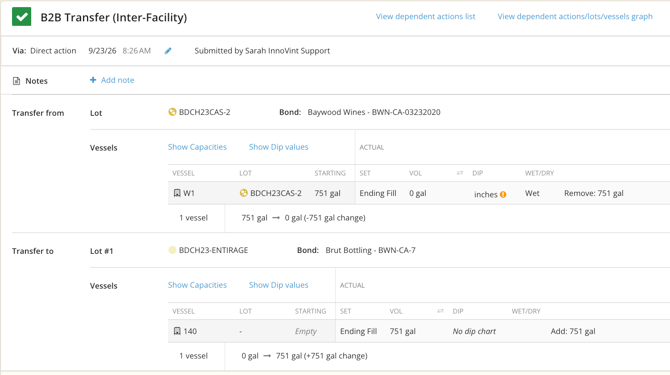
Heads up: You'll see a warning about blending across bonds each time you perform a bond transfer this way. This is expected for this workflow, and you can continue.
Step 2: Record the Bottling en Tirage action at the offsite bond
While the wine is in the offsite bond, bottle it en tirage.
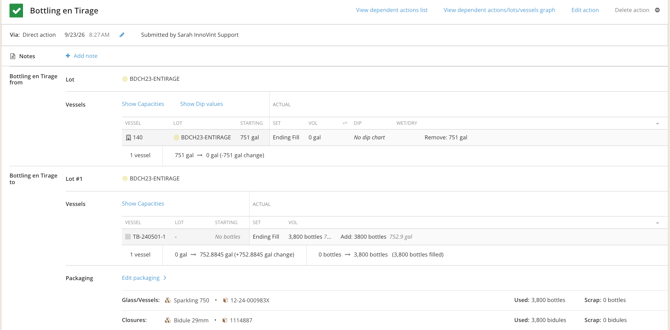
- On the new lot at the offsite bond, select Bottling en Tirage.
- Choose your dummy tirage bin(s) at the offsite bond as the destination for the bottles.
- Enter the bottle output.
- Apply your packaging. This is where you add the dry goods used — they'll be depleted from inventory and their cost will be added to the lot.
- Save the action.
Step 3: Change the tax class at the offsite bond
Once the Bottling en Tirage action is complete, change the tax class on the offsite lot to Sparkling – Bottle Fermented.
This ensures the bottles leave the offsite bond in the sparkling tax class when you transfer them back.
Step 4: Prepare your original lot to receive the bottles
Before transferring back, get your original lot at the home bond ready.
- Find your original lot at the home bond. If it was archived after the wine was transferred out, unarchive it.
- Change its tax class to Sparkling – Bottle Fermented.
Because the bottles will be coming out of the offsite bond in the bottle-fermented tax class, you want your home lot to receive them in that same tax class. That way, the wine appears on your TTB report as bottle-fermented sparkling wine received in bond.
If your original lot is not empty and still in a declared (not sparkling) tax class - you should receive the tirage wine back into a new, unique, lot in the correct Sparkling tax class.
Step 5: Transfer the tirage bottles back to your home bond
- From the offsite lot, select B2B Transfer (Inter-Facility) and choose your home bond as the destination.
- Add the incoming bottles with your original lot (the one you unarchived and updated in Step 4).
- Select the tirage bin(s) at your home bond to receive the bottles — your existing bins, or a single dummy bin, depending on how you track them.
- Enter the quantity of bottles being received.
- Save the action.
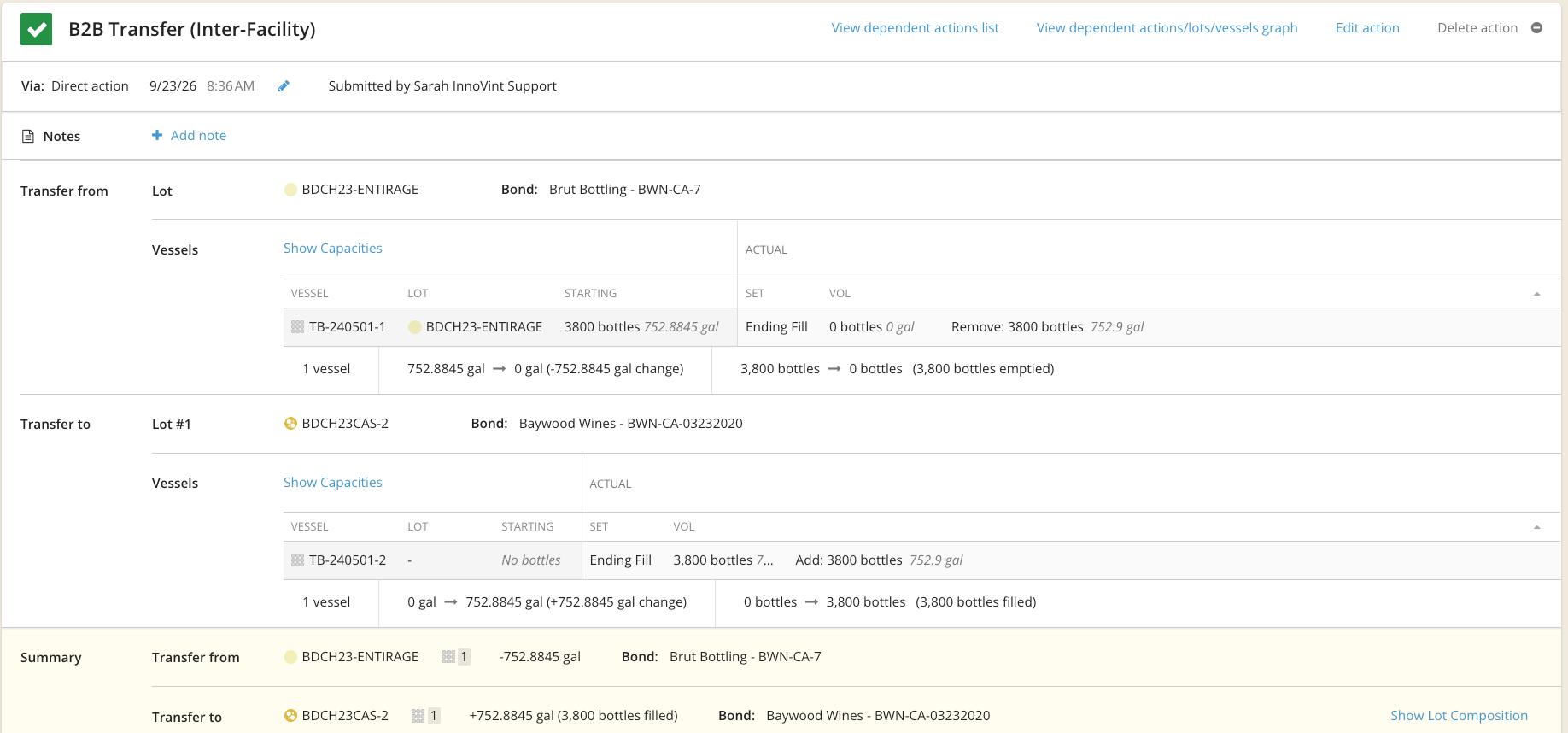
Heads up: You'll see a warning message about blending across bonds each time you perform a bond transfer this way. This is expected for this workflow, and you can continue.
Step 6: Review and tidy up your lot
Once the bottles are back home, a few optional clean-up steps help keep things clear:
- Update the lot type. In Lot Properties, change the lot's type to Sparkling. This updates the lot's label/indicator so it's easy to identify at a glance.
- Change the lot stage to En Tirage. This is optional, but it makes it easy to filter and find lots currently aging on the lees.
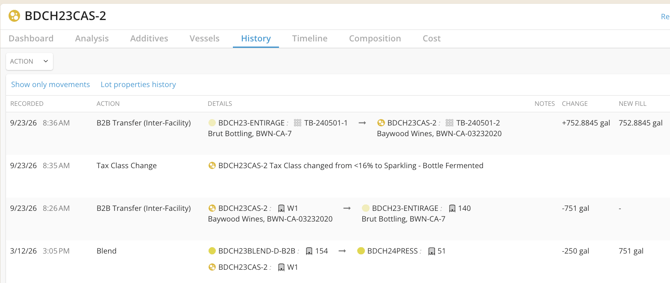
- Review the lot history. The bond transfers appear in the lot's history, and you can click through to the Bottling en Tirage action from there whenever you need to reference it.
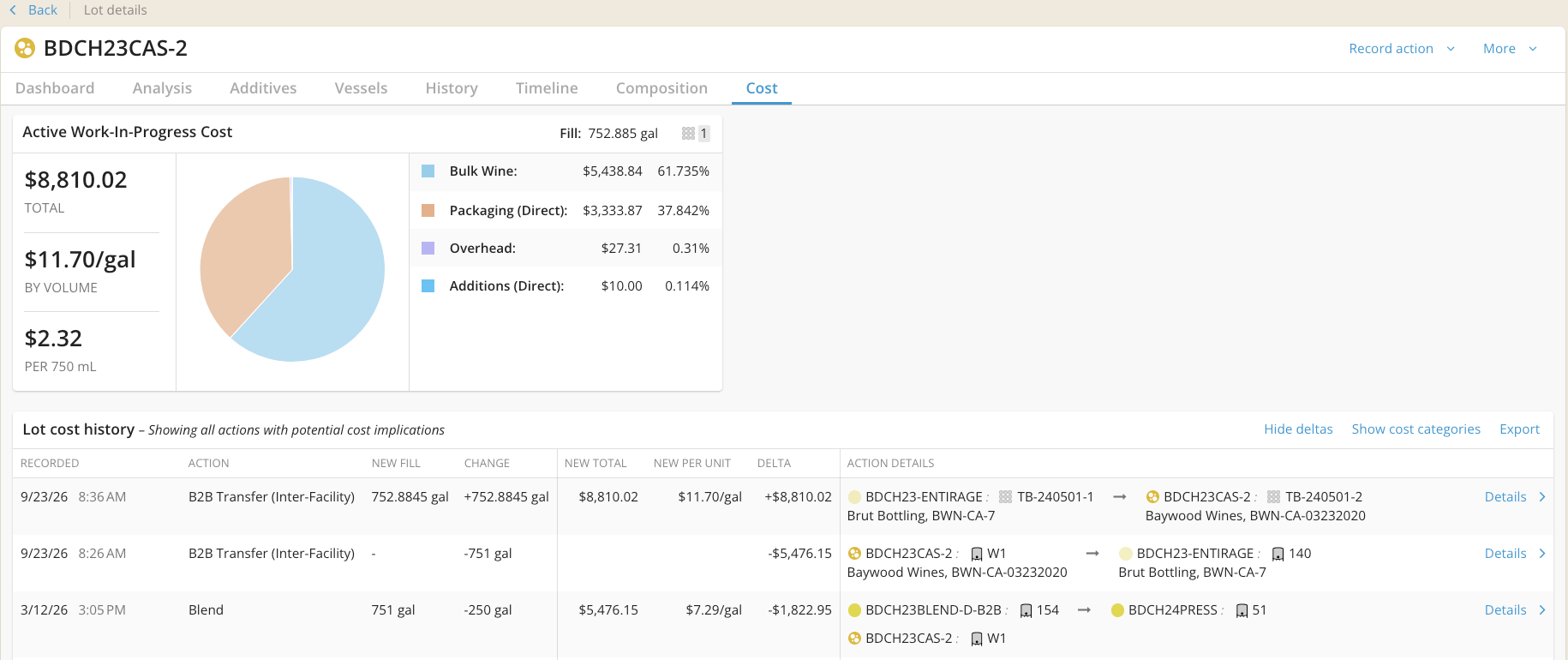
- Check the Cost tab. You'll notice the wine transferred out with no direct packaging cost, but when it was received back there's a large increase. That difference is the packaging cost added during the Bottling en Tirage action — this is expected.
Frequently Asked Questions
Q: Why not just record the Bottling En Tirage action in my own bond?
A: If the bottling physically happens at another bonded premises, the wine leaves your bond as bulk wine and returns as bottle-fermented sparkling wine. Recording the round trip with bond transfers, and doing the bottling while the wine is in the offsite bond, keeps your TTB report accurate for both removals and receipts in bond.
Q: Do I need to create real vessels and tirage bins at the offsite bond?
A: No. A single dummy vessel and a single dummy tirage bin at the offsite bond are usually enough, since the wine and bottles only pass through there briefly.
Q: When should I change the tax class?
A: Change the offsite lot to Sparkling Wine – Bottle Fermented after the Bottling en Tirage action (Step 3), and change your original home lot to the same Sparkling tax class before you transfer the bottles back (Step 4). The tax class at the moment of each transfer controls how it's reported to TTB.
Q: Can I use a new lot at my home bond instead of my original lot?
A: Yes. Combining back into the original lot code will keep the lot's full history and cost in one place, but a new, unique lot code will work. If your original lot code is not empty and in a different tax class, then you must create a new, unique lot code.
Q: What if the offsite facility isn't in my InnoVint account?
A: If the offsite bond isn't set up, please contact InnoVint Support to get it added.