---
title: "Compliance Reporting: How does SUPPLY populate the TTB Report?"
description: SUPPLY provides a comprehensive export to help you populate Section B - Bottled Wines for the TTB Report 5120.17. This article details how actions in SUPPLY map to the TTB export, where to find the e
---
[Skip to content](https://support.innovint.us/hc/en-us/how-does-supply-populate-the-ttb-report#main-content)
[Submit a help ticket](https://support.innovint.us/hc/en-us/kb-tickets/new?hsLang=en)
![InnoVintSupportCenter - header.png\]](https://support.innovint.us/hs-fs/hubfs/InnoVintSupportCenter%20-%20header.png?width=300&height=22&name=InnoVintSupportCenter%20-%20header.png)
Open main navigation
Close main navigation
- [Submit a help ticket](https://support.innovint.us/hc/en-us/kb-tickets/new)
How can we help you today?
- There are no suggestions because the search field is empty.
1. [Support Center](https://support.innovint.us/hc/en-us?hsLang=en)
2. [SUPPLY](https://support.innovint.us/hc/en-us/supply?hsLang=en)
3. [Using SUPPLY](https://support.innovint.us/hc/en-us/supply?hsLang=en#using-supply)
# Compliance Reporting: How does SUPPLY populate the TTB Report?
SUPPLY provides a comprehensive export to help you populate Section B - Bottled Wines for the TTB Report 5120.17.
This article details how actions in SUPPLY map to the TTB export, where to find the export, and how to use it.
- [How to find TTB Reporting](https://support.innovint.us/hc/en-us/how-does-supply-populate-the-ttb-report#How)
- [What are the sections of the TTB export?](https://support.innovint.us/hc/en-us/how-does-supply-populate-the-ttb-report#Sections)
- [How InnoVint maps to Section B - Bottled Wines](https://support.innovint.us/hc/en-us/how-does-supply-populate-the-ttb-report#Mapping)
- [Using the Audit tab](https://support.innovint.us/hc/en-us/how-does-supply-populate-the-ttb-report#Audit)
- [FAQ](https://support.innovint.us/hc/en-us/how-does-supply-populate-the-ttb-report#FAQ)
⚠️ SUPPLY allows you to negatively deplete inventory. If you have negative inventory quantities at the start or end of your reporting period, InnoVint does not guarantee that your TTB report data is accurate. Review the Negative Inventory section of the TTB export to find and review any problem inventory.
⚠️ SUPPLY supports a "compliance reason not set" option on Add and Deplete Inventory - Other actions. This reason may be chosen by you, or set by the Commerce7 Integration. Actions that have ‘Compliance reason not set’ (whether these actions are submitted by a user or C7) will be excluded from the TTB export and must be reviewed and corrected for accuracy.
### How to find TTB Reporting
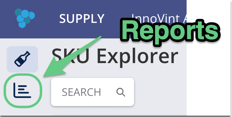
Navigate to the lefthand navigation menu and click on the Report icon:
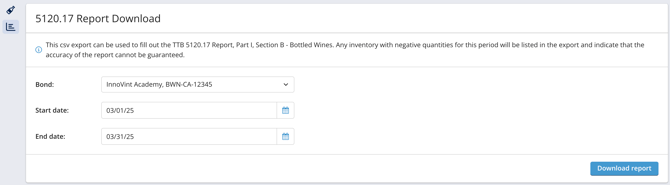
Set the desired bond and start/end date for your TTB export: click Download report.
### Sections of the TTB export
The SUPPLY TTB export contains four distinct sections:
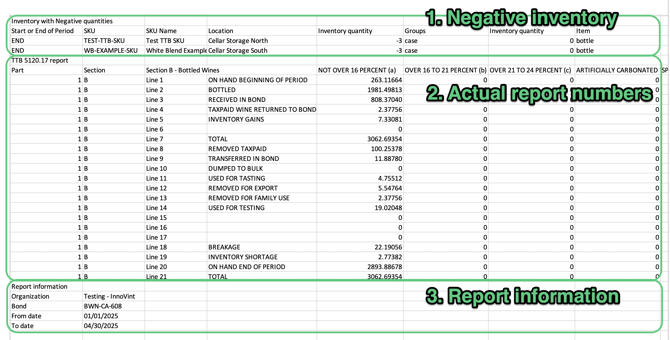
1. **Negative inventory**: SUPPLY allows users to negatively deplete inventory. In the event that you have a SKU with negative inventory at the start or end of period, those items will be listed at the start of the report. These negative balances need to be corrected before the reported numbers for Section B can be accurate.
2. **Actions with compliance reason not set:** In the event that you have actions recorded on in-bond SKUs with the compliance reason not set, they will be listed here. These volumes are NOT included in the TTB report export for the date range selected. Find and correct these actions via the Action History Feed.
3. **Actual report numbers**: This section displays the calculated values for each listed row in Part I, Section B. All lines are in US Gallons.
4. **Report information:** This section displays the start and end dates, the organization containing the bond, and the bond containing the reported inventory.
### How InnoVint maps to Section B - Bottled Wines
1. ON HAND BEGINNING OF PERIOD
Should match Section B, Line 20 ON HAND END OF PERIOD from the last submitted TTB report. This line is populated with volume via the [Onboard Inventory action](https://support.innovint.us/hc/en-us/how-to-onboard-inventory-in-supply?hsLang=en) when the onboarded SKU inventory is in bond.
2. BOTTLED
The total volume added to SUPPLY via the "Add Inventory" action with the reason "**Bottling**" (when the SKU tax status is "in-bond"). This value should match Part 1, Section A, Line 13 - BOTTLED from your bulk wine reporting.
3. RECEIVED IN BOND
The total volume added to SUPPLY via the "Add Inventory" action, with the reason "**Bond to bond transfer in**" (when the SKU tax status is "in-bond").
4. TAXPAID WINE RETURNED TO BOND
The volume of taxpaid case goods inventory returned to bond within the reporting period. This volume is logged when inventory is moved from a **taxpaid** location to an **in-bond** location using a "Move Inventory" action.
5. Write-in: INVENTORY GAINS
Any case goods inventory increase in volume. This volume is logged when inventory is increased via the Reconcile Inventory action.
*NOTE - PER TTB: Do not report bottled inventory gains unless a complete inventory of all bulk and bottled wine is taken (i.e., during your annual physical inventory).*
6. Write-in: (blank line)
InnoVint does not populate this write-in field at this time.
7. *TOTAL*
Calculated: Sum of Line 1 plus the amounts recorded in Lines 2-6
8. REMOVED TAXPAID
The volume of case goods inventory removed taxpaid within the reporting period. This removal is logged:
1. When inventory is moved from an **in-bond** location to a **taxpaid** location using a "Move Inventory" action.
2. When in-bond inventory is marked asremoved taxpaidvia a "Deplete Inventory" action with the Depletion type: "Sale".
3. Any in-bond inventory decrease in volume due to a Deplete Inventory action with the Depletion Type: "Other" and the compliance reason: "Removed Taxpaid.
9. TRANSFERRED IN BOND
The volume of case goods inventory transferred out of bond within the reporting period.
1. Case goods inventory is recorded as transferred in bond via a Deplete Inventory action with the Depletion type: "Bond to bond transfer".
2. Case goods inventory is recorded as transferred in bond via a Move inventory action between two different bonded locations.
10. DUMPED TO BULK
Any case goods inventory decrease in volume due to a Deplete Inventory action with the Depletion Type: "Other" and the compliance reason: "Bottled wine dumped to bulk".
11. USED FOR TASTING
Any case goods inventory decrease in volume due to a Deplete Inventory action with the Depletion Type: "Other" and the compliance reason: "Used for tasting".
12. REMOVED FOR EXPORT
Any case goods inventory decrease in volume due to a Deplete Inventory action with the Depletion Type: "Other" and the compliance reason: "Removed for export".
13. REMOVED FOR FAMILY USE
Any case goods inventory decrease in volume due to a Deplete Inventory action with the Depletion Type: "Other" and the compliance reason: "Removed for family use".
14. USED FOR TESTING
Any case goods inventory decrease in volume due to a Deplete Inventory action with the Depletion Type: "Other" and the compliance reason: "Used for testing".
15. Write-in: (blank line)
InnoVint does not populate this write-in field at this time.
16. Write-in: (blank line)
InnoVint does not populate this write-in field at this time.
17. Write-in: (blank line)
InnoVint does not populate this write-in field at this time.
18. BREAKAGE
Any case goods inventory decrease in volume due to a Deplete Inventory action with the Depletion Type: "Other" and the compliance reason: "Breakage".
19. INVENTORY SHORTAGE
Any case goods inventory decrease in volume.
1. due to a Deplete Inventory action with the Depletion Type: "Other" and the compliance reason: "Inventory Shortage".
2. when inventory is decreased via the Reconcile Inventory action.
*NOTE - PER TTB: Do not report bottled inventory shortages unless a complete inventory of all bulk and bottled wine is taken (i.e., during your annual physical inventory).*
20. ON HAND END OF PERIOD
Calculated. Sum of Line 7 TOTAL minus the amounts given in Lines 8-19.
21. TOTAL
Sum of Lines 8-20. Should be equal to Line 7.
### Using the Audit tab
The SUPPLY TTB export will download as a .xlsx file - this is to support multiple tabs on the export. The second tab is the Audit tab.
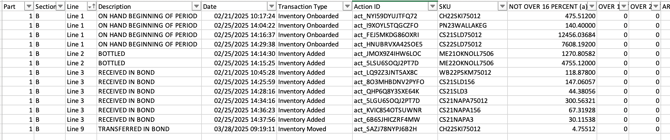
The Audit tab will display all actions that are mapped to the specified lines and are intended to provide a robust audit trail to determine how the report numbers are generated. Add and use filters to view actions contributing to your problem row.
### FAQ
**Q: How are you rounding the volumes for compliance reporting?**
*A: The TTB requires conversions to be rounded to 5 decimal places so we round the values in both the TTB report and the Audit report to 5 significant figures (including those values with trailing zeros, ie: 1.00000). For true zero numbers, we will show “0”.*
**Q: What is negative inventory and how to deal with it?**
*A: If the Negative Inventory section of the TTB export contains SKUs with a negative balance, you must find and review these SKU inventories in order to ensure that the report is accurate. *
**Q: I use InnoVint MAKE to track and bottle my bulk wines. How can I combine my MAKE TTB Report with the SUPPLY TTB export?**
*A: If you are tracking all of your case good inventory in SUPPLY after bottling (i.e. using an Add Inventory action with the reason "Bottling"), we recommend clearing the Section B generated by MAKE, and populate Section B entirely with the numbers tracked in SUPPLY. *
*We also strongly recommend confirming that the bottled volume in Line 13 of Part 1, Section A of MAKE matches with the Section B, Line 2 (Bottled) in SUPPLY. Please note that, due to rounding, MAKE should match to SUPPLY within 2 decimal places but may vary beyond that.*
- [New to InnoVint](https://support.innovint.us/hc/en-us/new-to-innovint?hsLang=en#main-content)
- [Accessing InnoVint](https://support.innovint.us/hc/en-us/new-to-innovint?hsLang=en#accessing-innovint)
- [Settings - MAKE, GROW & FINANCE](https://support.innovint.us/hc/en-us/new-to-innovint?hsLang=en#settings-make-grow-finance)
- [Getting Started - MAKE, GROW & FINANCE](https://support.innovint.us/hc/en-us/new-to-innovint?hsLang=en#getting-started-make-grow-finance)
- [MAKE](https://support.innovint.us/hc/en-us/make?hsLang=en#main-content)
- [Dashboard & Calendar](https://support.innovint.us/hc/en-us/make?hsLang=en#dashboard-calendar)
- [Lots](https://support.innovint.us/hc/en-us/make?hsLang=en#lots)
- [Vessels](https://support.innovint.us/hc/en-us/make?hsLang=en#vessels)
- [Work Orders](https://support.innovint.us/hc/en-us/make?hsLang=en#work-orders)
- [Recording Actions](https://support.innovint.us/hc/en-us/make?hsLang=en#recording-actions)
- [Movement Actions](https://support.innovint.us/hc/en-us/make?hsLang=en#movement-actions)
- [Topping](https://support.innovint.us/hc/en-us/make?hsLang=en#topping)
- [Analysis](https://support.innovint.us/hc/en-us/make?hsLang=en#analysis)
- [Analysis Reports](https://support.innovint.us/hc/en-us/make?hsLang=en#analysis-reports)
- [Additions](https://support.innovint.us/hc/en-us/make?hsLang=en#additions)
- [Case Goods in MAKE](https://support.innovint.us/hc/en-us/make?hsLang=en#case-goods-in-make)
- [Dry Goods](https://support.innovint.us/hc/en-us/make?hsLang=en#dry-goods)
- [Vineyards](https://support.innovint.us/hc/en-us/make?hsLang=en#vineyards)
- [Reporting](https://support.innovint.us/hc/en-us/make?hsLang=en#reporting)
- [Compliance](https://support.innovint.us/hc/en-us/make?hsLang=en#compliance)
- [Tags & Notes](https://support.innovint.us/hc/en-us/make?hsLang=en#tags-notes)
- [Printing Labels from InnoVint](https://support.innovint.us/hc/en-us/make?hsLang=en#printing-labels-from-innovint)
- [AI](https://support.innovint.us/hc/en-us/make?hsLang=en#ai)
- [GROW](https://support.innovint.us/hc/en-us/grow?hsLang=en)
- [FINANCE](https://support.innovint.us/hc/en-us/finance?hsLang=en#main-content)
- [Getting Started](https://support.innovint.us/hc/en-us/finance?hsLang=en#getting-started)
- [Reporting](https://support.innovint.us/hc/en-us/finance?hsLang=en#reporting)
- [Guidance & FAQ](https://support.innovint.us/hc/en-us/finance?hsLang=en#guidance-faq)
- [Harvest](https://support.innovint.us/hc/en-us/harvest?hsLang=en#main-content)
- [Preparing for Harvest](https://support.innovint.us/hc/en-us/harvest?hsLang=en#preparing-for-harvest)
- [Vineyard Harvest Reports](https://support.innovint.us/hc/en-us/harvest?hsLang=en#vineyard-harvest-reports)
- [Harvest Workflow & Fermentation Tracking](https://support.innovint.us/hc/en-us/harvest?hsLang=en#harvest-workflow-fermentation-tracking)
- [Settings & Preferences](https://support.innovint.us/hc/en-us/harvest?hsLang=en#settings-preferences)
- [MAKE: Advanced Features](https://support.innovint.us/hc/en-us/make-advanced-features?hsLang=en#main-content)
- [Owner-based Permissions System](https://support.innovint.us/hc/en-us/make-advanced-features?hsLang=en#owner-based-permissions-system)
- [Custom Attributes](https://support.innovint.us/hc/en-us/make-advanced-features?hsLang=en#custom-attributes)
- [Blend Trials](https://support.innovint.us/hc/en-us/make-advanced-features?hsLang=en#blend-trials)
- [Tank Maps](https://support.innovint.us/hc/en-us/make-advanced-features?hsLang=en#tank-maps)
- [Sparkling Wine Module](https://support.innovint.us/hc/en-us/make-advanced-features?hsLang=en#sparkling-wine-module)
- [Intended Use](https://support.innovint.us/hc/en-us/make-advanced-features?hsLang=en#intended-use)
- [Integrations](https://support.innovint.us/hc/en-us/make-advanced-features?hsLang=en#integrations)
- [SUPPLY](https://support.innovint.us/hc/en-us/supply?hsLang=en#main-content)
- [Getting Started with SUPPLY](https://support.innovint.us/hc/en-us/supply?hsLang=en#getting-started-with-supply)
- [Actions in SUPPLY](https://support.innovint.us/hc/en-us/supply?hsLang=en#actions-in-supply)
- [Using SUPPLY](https://support.innovint.us/hc/en-us/supply?hsLang=en#using-supply)
- [Order Management](https://support.innovint.us/hc/en-us/supply?hsLang=en#order-management)
- [InnoApp](https://support.innovint.us/hc/en-us/innoapp?hsLang=en#main-content)
- [InnoApp](https://support.innovint.us/hc/en-us/innoapp?hsLang=en#innoapp)
- [InnoApp - Work Orders](https://support.innovint.us/hc/en-us/innoapp?hsLang=en#innoapp-work-orders)
- [Guidance & FAQs](https://support.innovint.us/hc/en-us/guidance-faqs?hsLang=en#main-content)
- [Frequently Asked Questions](https://support.innovint.us/hc/en-us/guidance-faqs?hsLang=en#frequently-asked-questions)
- [Specialized Workflows](https://support.innovint.us/hc/en-us/guidance-faqs?hsLang=en#specialized-workflows)
- [Best Practices](https://support.innovint.us/hc/en-us/guidance-faqs?hsLang=en#best-practices)
- [Templates](https://support.innovint.us/hc/en-us/guidance-faqs?hsLang=en#templates)
- [InnoVint Academy](https://support.innovint.us/hc/en-us/innovint-academy?hsLang=en#main-content)
- [Video Trainings/Tutorials](https://support.innovint.us/hc/en-us/innovint-academy?hsLang=en#video-trainings-tutorials)
- [Video Informational Sessions](https://support.innovint.us/hc/en-us/innovint-academy?hsLang=en#video-informational-sessions)
- [Quick Video Tutorials](https://support.innovint.us/hc/en-us/innovint-academy?hsLang=en#quick-video-tutorials)
- [Product Updates](https://support.innovint.us/hc/en-us/product-updates?hsLang=en#main-content)
- [Product Updates: 2025-2026](https://support.innovint.us/hc/en-us/product-updates?hsLang=en#product-updates-2025-2026)
- [Product Updates: 2024](https://support.innovint.us/hc/en-us/product-updates?hsLang=en#product-updates-2024)
- [Product Updates: 2023](https://support.innovint.us/hc/en-us/product-updates?hsLang=en#product-updates-2023)
- [Product Updates: 2017 - 2022](https://support.innovint.us/hc/en-us/product-updates?hsLang=en#product-updates-2017-2022)
- [Support Hours & FAQs](https://support.innovint.us/hc/en-us/support-hours-faqs?hsLang=en)
[](https://support.innovint.us/hc/en-us?hsLang=en)
Copyright © 2025, InnoVint