---
title: How to Record and Track Data and Analyses on Vineyard Blocks
description: With InnoVint's GROW module activated, you can record analysis, phenology, and vineyard events to track vineyard blocks throughout the growing season. Crop estimates can also be recorded to help with
---
[Skip to content](https://support.innovint.us/hc/en-us/articles/360026806092-how-to-record-and-track-data-and-analyses-on-vineyard-blocks#main-content)
[Submit a help ticket](https://support.innovint.us/hc/en-us/kb-tickets/new?hsLang=en)
![InnoVintSupportCenter - header.png\]](https://support.innovint.us/hs-fs/hubfs/InnoVintSupportCenter%20-%20header.png?width=300&height=22&name=InnoVintSupportCenter%20-%20header.png)
Open main navigation
Close main navigation
- [Submit a help ticket](https://support.innovint.us/hc/en-us/kb-tickets/new)
How can we help you today?
- There are no suggestions because the search field is empty.
1. [Support Center](https://support.innovint.us/hc/en-us?hsLang=en)
2. [GROW](https://support.innovint.us/hc/en-us/grow?hsLang=en)
# How to Record and Track Data and Analyses on Vineyard Blocks
With InnoVint's GROW module activated, you can record analysis, phenology, and vineyard events to track vineyard blocks throughout the growing season. Crop estimates can also be recorded to help with vintage forecasting and preparation for harvest. This article deals specifically with desktop functionality; you can also [record events and analysis using InnoApp](https://support.innovint.us/hc/en-us/mobile-app-how-to-enter-vineyard-events-and-crop-estimates?hsLang=en) - even offline!
This article covers:
- [How to record analysis on a block](https://support.innovint.us/hc/en-us/articles/360026806092-how-to-record-and-track-data-and-analyses-on-vineyard-blocks#analysis)
- [How to record a vineyard event](https://support.innovint.us/hc/en-us/articles/360026806092-how-to-record-and-track-data-and-analyses-on-vineyard-blocks#event)
- [How to record a crop estimate](https://support.innovint.us/hc/en-us/articles/360026806092-how-to-record-and-track-data-and-analyses-on-vineyard-blocks#cropestimate)
- [How to edit or delete recorded vineyard data and analysis](https://support.innovint.us/hc/en-us/articles/360026806092-how-to-record-and-track-data-and-analyses-on-vineyard-blocks#edit)
- [How to view and track data and analysis on blocks](https://support.innovint.us/hc/en-us/articles/360026806092-how-to-record-and-track-data-and-analyses-on-vineyard-blocks#view)
- [Vineyard Analysis graphs and lists](https://support.innovint.us/hc/en-us/articles/360026806092-how-to-record-and-track-data-and-analyses-on-vineyard-blocks#vineyarddetails)
- [Vineyard Reports](https://support.innovint.us/hc/en-us/articles/360026806092-how-to-record-and-track-data-and-analyses-on-vineyard-blocks#vineyardreports)
 To begin recording Vineyard data, click on in the left navigation bar to take you to the Vineyard Dashboard. Then click on *Record* in the top right corner.

Don't see the Vineyard Dashboard? The Vineyard Dashboard is a feature that requires the GROW module. If you wish to activate GROW, please contact our Customer Success Team at [support@innovint.us](mailto:support@innovint.us).
We support both Southern and Northern Hemisphere growing seasons: depending on your winery settings, this changes the current year "vintages" setting:
- Northern Hemisphere: current vintage is set for January 1 - December 31
- Southern Hemisphere: current vintage is set for July 1 - June 30th
### How to record analysis on a block
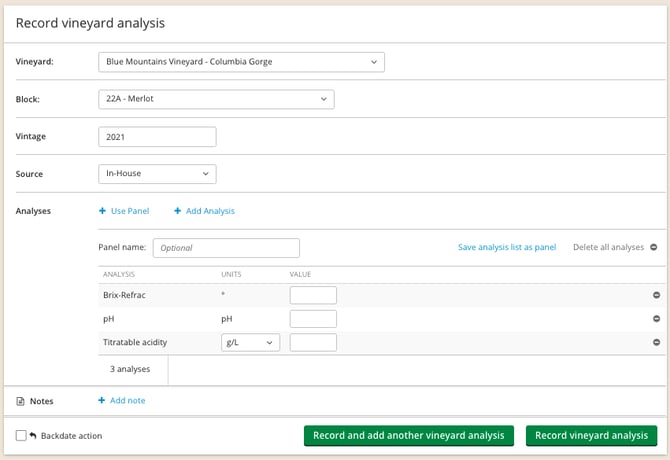
From the Record dropdown, select Analysis.
- **Vineyard** Select from the dropdown.
- **Block** Select from the dropdown.
- **Vintage** Defaults to the current year. Enter a different year if backdating historical data.
- **Source** Select from the dropdown.
- **Analyses** Use a panel or add analyses.
- Enter your values
- **Notes **Enter any additional information.
- **Backdate** If entering historical data, remember to backdate your entry.
- You will get an orange warning message if the backdated year does not match the vintage year.
Click  or .
Vineyard analysis import is not currently supported.
### How to record a vineyard event
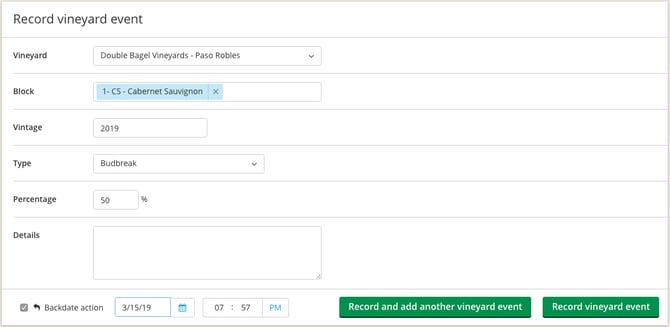
From the Record dropdown, select Event.
- **Vineyard** Select from the dropdown.
- **Block** Select one, multiple or all blocks from the dropdown.
- **Vintage** Defaults to the current year. Enter a different year if backdating historical data.
- **Type **Select a Phenology stage, Application tracking, or Visual Observation from the dropdown.
- For Phenology, multiple dates may be entered for each stage. Enter in the % for each entry.
- **Details** Enter any additional information
- **Backdate** If entering historical data, remember to backdate your entry.
- You will get an orange warning message if the backdated year does not match the vintage year.
If you are recording multiple events, don't forget that you can import multiple vineyard events via CSV file. Find the import instructions [here.](https://support.innovint.us/hc/en-us/how-to-import-vineyard-events-via-csv-file?hsLang=en)
Vineyard analysis is not supported in this import.
### How to record a crop estimate
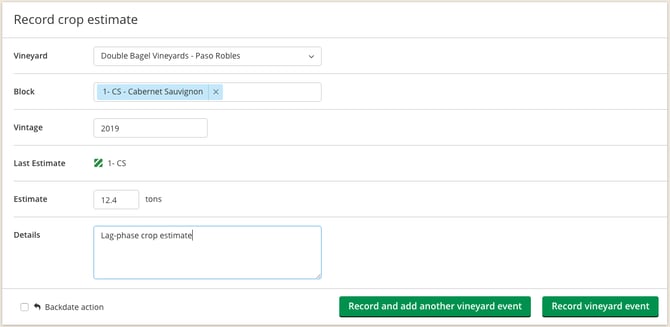
From the Record dropdown, select Crop estimate.
- **Vineyard** Select from the dropdown.
- **Block** Select one, multiple, or all blocks from the dropdown.
- **Vintage** Defaults to the current year. Enter a different year if backdating historical data.
- **Last Estimate **Will display the most recent crop estimate for the select block(s)
- **Estimate **Enter the crop estimate per block.
- **Details **Enter any additional information.
- **Backdate** If entering historical data, remember to backdate your entry.
- You will get an orange warning message if the backdated year does not match the vintage year.
If you are recording multiple crop estimates, don't forget that you can import multiple estimates via CSV file. Find the import instructions [here.](https://support.innovint.us/hc/en-us/how-to-import-vineyard-events-via-csv-file?hsLang=en)
### How to edit or delete recorded vineyard data and analysis
#### Edit or delete a vineyard event or crop estimate
Go to the Events tab in the Vineyard Details page.

Use the filters to refine the list. Select the event or crop estimate you would like to edit or delete.
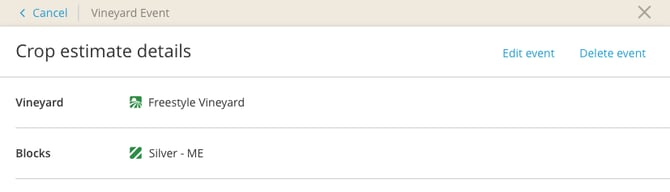
Click on *Edit event* or *Delete event*. If you are editing a vineyard event or crop estimate, make the necessary changes and select *Record*.
#### Edit or delete recorded analysis
InnoVint allows you to edit the value for a recorded analysis. You cannot edit the effective date or analysis type. To change the effective date or analysis type for a recorded analysis, we recommend deleting the entry and re-recording a new analysis.
Go to the Analysis tab in the Vineyard Details page. Then go to *All analyses in a list*.
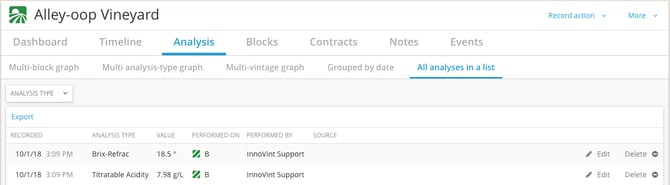
Find the analysis in the list, then click on *Edit* or *Delete* in the far right of the row.
### How to view and track data and analysis on vineyard blocks
#### From the Vineyard Details page
Go to the Analysis tab of the Vineyard Details page.
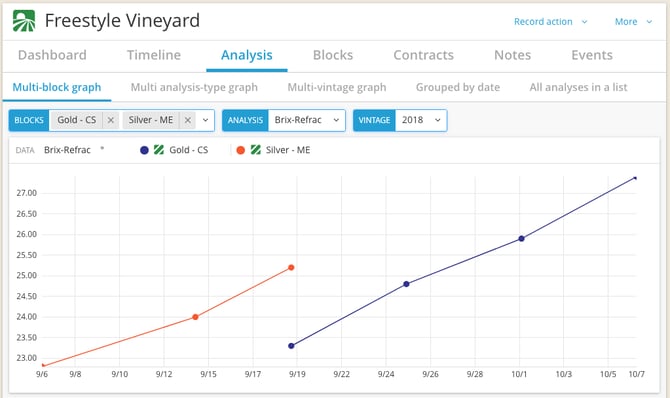
You can select different types of graphs from the sub-tabs.
- **Multi-block graph** allows you to filter for multiple blocks to view a single analysis type per vintage.
- **Multi analysis-type graph** can display multiple analysis types for a single block per vintage.
- **Multi-vintage graph** allows you to view a single analysis type for a block over multiple vintages.
You can also view analysis:
- **Grouped by date**. Use the filters at the top to narrow your search to specific analysis types for one or all of you blocks.
- **In a list.** Use the filter to narrow your search by analysis types. This report can also be exported.
#### Vineyard Reports
Go to *Reports* in the Vineyard Dashboard.

- **Vintage Phenology and Forecasting Report** displays all recorded phenology and harvest dates for the current vintage and historical averages.
- **Current Harvest Report** populates with block data to give you an overview of the current harvest status. Displays the harvest status, forecasted and scheduled fruit receival dates, and fruit weight (historical average, crop estimates, and received tonnage).
- **Fruit Intake Report** displays all the fruit received during harvest via Receive Fruit direct action or work order task. This report is also accessible via the Report Explorer and you can see more information on it [here](https://support.innovint.us/hc/en-us/articles/205606335-fruit-intake-report?hsLang=en).
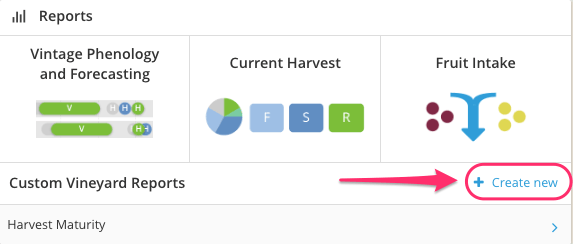
- **Custom Vineyard Reports** allow you to create a custom report to view and export block analyses.
- Go to the Reports card on the Vineyard Dashboard to create a new Custom Vineyard Report.
- **Export vineyard events **provides a csv export of all Vineyard Events, including Phenology, Application, Visual Observations and Crop Estimates. This report can also be exported from the Vintage Phenology Forecasting report page.
- [New to InnoVint](https://support.innovint.us/hc/en-us/new-to-innovint?hsLang=en#main-content)
- [Accessing InnoVint](https://support.innovint.us/hc/en-us/new-to-innovint?hsLang=en#accessing-innovint)
- [Settings - MAKE, GROW & FINANCE](https://support.innovint.us/hc/en-us/new-to-innovint?hsLang=en#settings-make-grow-finance)
- [Getting Started - MAKE, GROW & FINANCE](https://support.innovint.us/hc/en-us/new-to-innovint?hsLang=en#getting-started-make-grow-finance)
- [MAKE](https://support.innovint.us/hc/en-us/make?hsLang=en#main-content)
- [Dashboard & Calendar](https://support.innovint.us/hc/en-us/make?hsLang=en#dashboard-calendar)
- [Lots](https://support.innovint.us/hc/en-us/make?hsLang=en#lots)
- [Vessels](https://support.innovint.us/hc/en-us/make?hsLang=en#vessels)
- [Work Orders](https://support.innovint.us/hc/en-us/make?hsLang=en#work-orders)
- [Recording Actions](https://support.innovint.us/hc/en-us/make?hsLang=en#recording-actions)
- [Movement Actions](https://support.innovint.us/hc/en-us/make?hsLang=en#movement-actions)
- [Topping](https://support.innovint.us/hc/en-us/make?hsLang=en#topping)
- [Analysis](https://support.innovint.us/hc/en-us/make?hsLang=en#analysis)
- [Analysis Reports](https://support.innovint.us/hc/en-us/make?hsLang=en#analysis-reports)
- [Additions](https://support.innovint.us/hc/en-us/make?hsLang=en#additions)
- [Case Goods in MAKE](https://support.innovint.us/hc/en-us/make?hsLang=en#case-goods-in-make)
- [Dry Goods](https://support.innovint.us/hc/en-us/make?hsLang=en#dry-goods)
- [Vineyards](https://support.innovint.us/hc/en-us/make?hsLang=en#vineyards)
- [Reporting](https://support.innovint.us/hc/en-us/make?hsLang=en#reporting)
- [Compliance](https://support.innovint.us/hc/en-us/make?hsLang=en#compliance)
- [Tags & Notes](https://support.innovint.us/hc/en-us/make?hsLang=en#tags-notes)
- [Printing Labels from InnoVint](https://support.innovint.us/hc/en-us/make?hsLang=en#printing-labels-from-innovint)
- [AI](https://support.innovint.us/hc/en-us/make?hsLang=en#ai)
- [GROW](https://support.innovint.us/hc/en-us/grow?hsLang=en)
- [FINANCE](https://support.innovint.us/hc/en-us/finance?hsLang=en#main-content)
- [Getting Started](https://support.innovint.us/hc/en-us/finance?hsLang=en#getting-started)
- [Reporting](https://support.innovint.us/hc/en-us/finance?hsLang=en#reporting)
- [Guidance & FAQ](https://support.innovint.us/hc/en-us/finance?hsLang=en#guidance-faq)
- [Harvest](https://support.innovint.us/hc/en-us/harvest?hsLang=en#main-content)
- [Preparing for Harvest](https://support.innovint.us/hc/en-us/harvest?hsLang=en#preparing-for-harvest)
- [Vineyard Harvest Reports](https://support.innovint.us/hc/en-us/harvest?hsLang=en#vineyard-harvest-reports)
- [Harvest Workflow & Fermentation Tracking](https://support.innovint.us/hc/en-us/harvest?hsLang=en#harvest-workflow-fermentation-tracking)
- [Settings & Preferences](https://support.innovint.us/hc/en-us/harvest?hsLang=en#settings-preferences)
- [MAKE: Advanced Features](https://support.innovint.us/hc/en-us/make-advanced-features?hsLang=en#main-content)
- [Owner-based Permissions System](https://support.innovint.us/hc/en-us/make-advanced-features?hsLang=en#owner-based-permissions-system)
- [Custom Attributes](https://support.innovint.us/hc/en-us/make-advanced-features?hsLang=en#custom-attributes)
- [Blend Trials](https://support.innovint.us/hc/en-us/make-advanced-features?hsLang=en#blend-trials)
- [Tank Maps](https://support.innovint.us/hc/en-us/make-advanced-features?hsLang=en#tank-maps)
- [Sparkling Wine Module](https://support.innovint.us/hc/en-us/make-advanced-features?hsLang=en#sparkling-wine-module)
- [Intended Use](https://support.innovint.us/hc/en-us/make-advanced-features?hsLang=en#intended-use)
- [Integrations](https://support.innovint.us/hc/en-us/make-advanced-features?hsLang=en#integrations)
- [SUPPLY](https://support.innovint.us/hc/en-us/supply?hsLang=en#main-content)
- [Getting Started with SUPPLY](https://support.innovint.us/hc/en-us/supply?hsLang=en#getting-started-with-supply)
- [Actions in SUPPLY](https://support.innovint.us/hc/en-us/supply?hsLang=en#actions-in-supply)
- [Using SUPPLY](https://support.innovint.us/hc/en-us/supply?hsLang=en#using-supply)
- [Order Management](https://support.innovint.us/hc/en-us/supply?hsLang=en#order-management)
- [InnoApp](https://support.innovint.us/hc/en-us/innoapp?hsLang=en#main-content)
- [InnoApp](https://support.innovint.us/hc/en-us/innoapp?hsLang=en#innoapp)
- [InnoApp - Work Orders](https://support.innovint.us/hc/en-us/innoapp?hsLang=en#innoapp-work-orders)
- [Guidance & FAQs](https://support.innovint.us/hc/en-us/guidance-faqs?hsLang=en#main-content)
- [Frequently Asked Questions](https://support.innovint.us/hc/en-us/guidance-faqs?hsLang=en#frequently-asked-questions)
- [Specialized Workflows](https://support.innovint.us/hc/en-us/guidance-faqs?hsLang=en#specialized-workflows)
- [Best Practices](https://support.innovint.us/hc/en-us/guidance-faqs?hsLang=en#best-practices)
- [Templates](https://support.innovint.us/hc/en-us/guidance-faqs?hsLang=en#templates)
- [InnoVint Academy](https://support.innovint.us/hc/en-us/innovint-academy?hsLang=en#main-content)
- [Video Trainings/Tutorials](https://support.innovint.us/hc/en-us/innovint-academy?hsLang=en#video-trainings-tutorials)
- [Video Informational Sessions](https://support.innovint.us/hc/en-us/innovint-academy?hsLang=en#video-informational-sessions)
- [Quick Video Tutorials](https://support.innovint.us/hc/en-us/innovint-academy?hsLang=en#quick-video-tutorials)
- [Product Updates](https://support.innovint.us/hc/en-us/product-updates?hsLang=en#main-content)
- [Product Updates: 2025-2026](https://support.innovint.us/hc/en-us/product-updates?hsLang=en#product-updates-2025-2026)
- [Product Updates: 2024](https://support.innovint.us/hc/en-us/product-updates?hsLang=en#product-updates-2024)
- [Product Updates: 2023](https://support.innovint.us/hc/en-us/product-updates?hsLang=en#product-updates-2023)
- [Product Updates: 2017 - 2022](https://support.innovint.us/hc/en-us/product-updates?hsLang=en#product-updates-2017-2022)
- [Support Hours & FAQs](https://support.innovint.us/hc/en-us/support-hours-faqs?hsLang=en)
[](https://support.innovint.us/hc/en-us?hsLang=en)
Copyright © 2025, InnoVint