---
title: Declare or Edit Tax Class
description: "You can set or change the tax class of a lot in three places: WARNING: Tax class changes necessarily have TTB 5120.17 implications. If you declare a wine while the lot is still in weight InnoVint will"
---
[Skip to content](https://support.innovint.us/hc/en-us/articles/207936576-declare-or-edit-tax-class#main-content)
[Submit a help ticket](https://support.innovint.us/hc/en-us/kb-tickets/new?hsLang=en)
![InnoVintSupportCenter - header.png\]](https://support.innovint.us/hs-fs/hubfs/InnoVintSupportCenter%20-%20header.png?width=300&height=22&name=InnoVintSupportCenter%20-%20header.png)
Open main navigation
Close main navigation
- [Submit a help ticket](https://support.innovint.us/hc/en-us/kb-tickets/new)
How can we help you today?
- There are no suggestions because the search field is empty.
1. [Support Center](https://support.innovint.us/hc/en-us?hsLang=en)
2. [MAKE](https://support.innovint.us/hc/en-us/make?hsLang=en)
3. [Compliance](https://support.innovint.us/hc/en-us/make?hsLang=en#compliance)
# Declare or Edit Tax Class
InnoVint makes it easy to declare and edit tax classes on lots, which map directly to the TTB Report.
- You can set or change the tax class of a lot in three places:
- [At lot creation](https://support.innovint.us/hc/en-us/articles/207936576-declare-or-edit-tax-class#creation) (effective as of Lot Creation)
- [From the Lot details page](https://support.innovint.us/hc/en-us/articles/207936576-declare-or-edit-tax-class#LotDetails) (effective as of any date, or as of Lot Creation)
- [In the Tax Class Declaration report](https://support.innovint.us/hc/en-us/articles/207936576-declare-or-edit-tax-class#report) (effective as of the current date)
- Check out this [video tutorial](https://support.innovint.us/hc/en-us/articles/207936576-declare-or-edit-tax-class#video-tutorial) to walk through declaring wine using two methods, as well as how to correct tax classes if they were set incorrectly at lot creation.
- [Two tips for declaring and editing tax classes](https://support.innovint.us/hc/en-us/articles/207936576-declare-or-edit-tax-class#tips)
**WARNING:** Tax class changes necessarily have TTB 5120.17 implications. If you declare a wine while the lot is still in weight InnoVint will use the expected yield to determine the volume moved to a declared tax class. We recommend only declaring tax classes **after** a lot is in volume to avoid any unintended gains and/or losses after a lot has been drained and pressed. Any mistakes when declaring a tax class can be deleted and re-entered at different dates.
See our quick video tip on Tax Class changes and declarations at harvest [here](https://support.innovint.us/hc/en-us/how-to-change-tax-class?hsLang=en).
### At Lot Creation
For US wineries, when adding a new lot from the Create Lot Page or in-line in an action, Tax Class is a required field. This will set the tax class as of the date and time of lot creation.
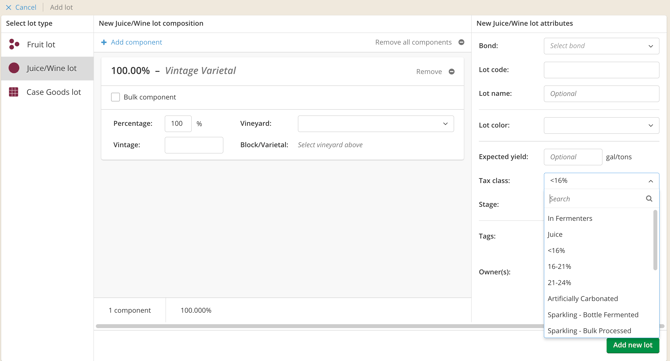
**Note:** When creating a lot, the lot creation date is set to the current date and time. If any action is backdated prior to that date, the lot will automatically set the "creation" date to the same date and time as the earliest backdated action.
### From the Lot Details page
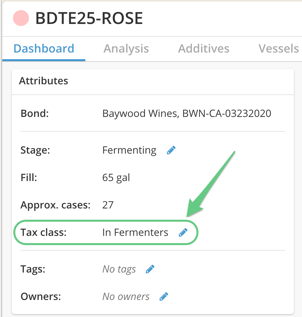
The Tax Class can be declared or changed on each Lot Details Page using the pencil icon next to Tax Class.
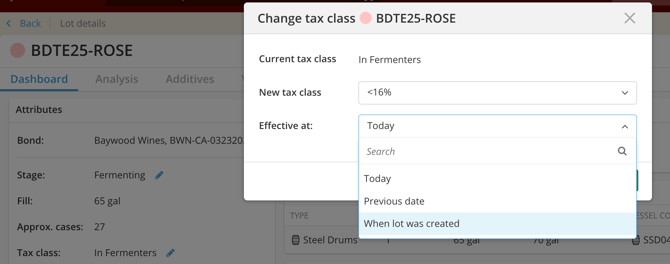
Select the new tax class from the dropdown list and select the *Effective at* date.
Selecting any option besides "When lot was created" will record a change on the TTB Report.
**Tip!** Tax class changes are not dependent actions, and therefore can be changed (or deleted) at any time. Archived lots are also eligible for tax class changes, which can be made effective to before the archive date.
**Note:** If there is a mistake when declaring a tax class, you must delete the tax class change action and record a new tax class change. If a lot was onboarded or created under the wrong tax class, there will not be a previous tax class change action to delete and you can edit the tax class as needed (be sure to use the option "When lot was created").
### In the Tax Class Declaration report
1. Go to Tax Class Declaration in the Report Explorer, under the Compliance Reports header:

2. For each row, select the tax class from the dropdown list
3. Click the *Set tax class* button. This will change the tax class **as of the current date and time**. You will **not** be able to backdate tax class changes from this report
### Video tutorial
Check out a quick how to video covering the Tax Class Declaration Report, and how to correct the tax class on existing lots.
### Two tips when declaring and editing tax classes
1. Don't declare or create lots in weight in a declared tax class. If you declare a wine while the lot is still in weight - or accidentally create that lot in a declared tax class (\<16%, etc) - then InnoVint will use the expected yield to determine the volume moved to that declared tax class. We recommend only declaring tax classes **after** a lot is in volume to avoid any unintended gains and/or losses after a lot has been drained and pressed. *Any mistakes when declaring a tax class can be deleted and re-entered at different dates.*
2. Tax class changes are not dependent actions, and therefore can be changed (or deleted) at any time. Archived lots are also eligible for tax class changes, which can be made effective to before the archive date. These changes will impact where the volume appears on the TTB Report, as of the date of the Tax Class change action.
**Note:** If there is a mistake when recording a tax class change, you must delete that tax class change action and record a new tax class change.
If a lot was onboarded or created under the wrong tax class, there will not be a previous tax class change action to delete and you can change the tax class as needed (be sure to use the option "When lot was created").
See our quick video tip on Tax Class changes and declarations at harvest [here](https://support.innovint.us/hc/en-us/how-to-change-tax-class?hsLang=en).
- [New to InnoVint](https://support.innovint.us/hc/en-us/new-to-innovint?hsLang=en#main-content)
- [Accessing InnoVint](https://support.innovint.us/hc/en-us/new-to-innovint?hsLang=en#accessing-innovint)
- [Settings - MAKE, GROW & FINANCE](https://support.innovint.us/hc/en-us/new-to-innovint?hsLang=en#settings-make-grow-finance)
- [Getting Started - MAKE, GROW & FINANCE](https://support.innovint.us/hc/en-us/new-to-innovint?hsLang=en#getting-started-make-grow-finance)
- [MAKE](https://support.innovint.us/hc/en-us/make?hsLang=en#main-content)
- [Dashboard & Calendar](https://support.innovint.us/hc/en-us/make?hsLang=en#dashboard-calendar)
- [Lots](https://support.innovint.us/hc/en-us/make?hsLang=en#lots)
- [Vessels](https://support.innovint.us/hc/en-us/make?hsLang=en#vessels)
- [Work Orders](https://support.innovint.us/hc/en-us/make?hsLang=en#work-orders)
- [Recording Actions](https://support.innovint.us/hc/en-us/make?hsLang=en#recording-actions)
- [Movement Actions](https://support.innovint.us/hc/en-us/make?hsLang=en#movement-actions)
- [Topping](https://support.innovint.us/hc/en-us/make?hsLang=en#topping)
- [Analysis](https://support.innovint.us/hc/en-us/make?hsLang=en#analysis)
- [Analysis Reports](https://support.innovint.us/hc/en-us/make?hsLang=en#analysis-reports)
- [Additions](https://support.innovint.us/hc/en-us/make?hsLang=en#additions)
- [Case Goods in MAKE](https://support.innovint.us/hc/en-us/make?hsLang=en#case-goods-in-make)
- [Dry Goods](https://support.innovint.us/hc/en-us/make?hsLang=en#dry-goods)
- [Vineyards](https://support.innovint.us/hc/en-us/make?hsLang=en#vineyards)
- [Reporting](https://support.innovint.us/hc/en-us/make?hsLang=en#reporting)
- [Compliance](https://support.innovint.us/hc/en-us/make?hsLang=en#compliance)
- [Tags & Notes](https://support.innovint.us/hc/en-us/make?hsLang=en#tags-notes)
- [Printing Labels from InnoVint](https://support.innovint.us/hc/en-us/make?hsLang=en#printing-labels-from-innovint)
- [AI](https://support.innovint.us/hc/en-us/make?hsLang=en#ai)
- [GROW](https://support.innovint.us/hc/en-us/grow?hsLang=en)
- [FINANCE](https://support.innovint.us/hc/en-us/finance?hsLang=en#main-content)
- [Getting Started](https://support.innovint.us/hc/en-us/finance?hsLang=en#getting-started)
- [Reporting](https://support.innovint.us/hc/en-us/finance?hsLang=en#reporting)
- [Guidance & FAQ](https://support.innovint.us/hc/en-us/finance?hsLang=en#guidance-faq)
- [Harvest](https://support.innovint.us/hc/en-us/harvest?hsLang=en#main-content)
- [Preparing for Harvest](https://support.innovint.us/hc/en-us/harvest?hsLang=en#preparing-for-harvest)
- [Vineyard Harvest Reports](https://support.innovint.us/hc/en-us/harvest?hsLang=en#vineyard-harvest-reports)
- [Harvest Workflow & Fermentation Tracking](https://support.innovint.us/hc/en-us/harvest?hsLang=en#harvest-workflow-fermentation-tracking)
- [Settings & Preferences](https://support.innovint.us/hc/en-us/harvest?hsLang=en#settings-preferences)
- [MAKE: Advanced Features](https://support.innovint.us/hc/en-us/make-advanced-features?hsLang=en#main-content)
- [Owner-based Permissions System](https://support.innovint.us/hc/en-us/make-advanced-features?hsLang=en#owner-based-permissions-system)
- [Custom Attributes](https://support.innovint.us/hc/en-us/make-advanced-features?hsLang=en#custom-attributes)
- [Blend Trials](https://support.innovint.us/hc/en-us/make-advanced-features?hsLang=en#blend-trials)
- [Tank Maps](https://support.innovint.us/hc/en-us/make-advanced-features?hsLang=en#tank-maps)
- [Sparkling Wine Module](https://support.innovint.us/hc/en-us/make-advanced-features?hsLang=en#sparkling-wine-module)
- [Intended Use](https://support.innovint.us/hc/en-us/make-advanced-features?hsLang=en#intended-use)
- [Integrations](https://support.innovint.us/hc/en-us/make-advanced-features?hsLang=en#integrations)
- [SUPPLY](https://support.innovint.us/hc/en-us/supply?hsLang=en#main-content)
- [Getting Started with SUPPLY](https://support.innovint.us/hc/en-us/supply?hsLang=en#getting-started-with-supply)
- [Actions in SUPPLY](https://support.innovint.us/hc/en-us/supply?hsLang=en#actions-in-supply)
- [Using SUPPLY](https://support.innovint.us/hc/en-us/supply?hsLang=en#using-supply)
- [Order Management](https://support.innovint.us/hc/en-us/supply?hsLang=en#order-management)
- [InnoApp](https://support.innovint.us/hc/en-us/innoapp?hsLang=en#main-content)
- [InnoApp](https://support.innovint.us/hc/en-us/innoapp?hsLang=en#innoapp)
- [InnoApp - Work Orders](https://support.innovint.us/hc/en-us/innoapp?hsLang=en#innoapp-work-orders)
- [Guidance & FAQs](https://support.innovint.us/hc/en-us/guidance-faqs?hsLang=en#main-content)
- [Frequently Asked Questions](https://support.innovint.us/hc/en-us/guidance-faqs?hsLang=en#frequently-asked-questions)
- [Specialized Workflows](https://support.innovint.us/hc/en-us/guidance-faqs?hsLang=en#specialized-workflows)
- [Best Practices](https://support.innovint.us/hc/en-us/guidance-faqs?hsLang=en#best-practices)
- [Templates](https://support.innovint.us/hc/en-us/guidance-faqs?hsLang=en#templates)
- [InnoVint Academy](https://support.innovint.us/hc/en-us/innovint-academy?hsLang=en#main-content)
- [Video Trainings/Tutorials](https://support.innovint.us/hc/en-us/innovint-academy?hsLang=en#video-trainings-tutorials)
- [Video Informational Sessions](https://support.innovint.us/hc/en-us/innovint-academy?hsLang=en#video-informational-sessions)
- [Quick Video Tutorials](https://support.innovint.us/hc/en-us/innovint-academy?hsLang=en#quick-video-tutorials)
- [Product Updates](https://support.innovint.us/hc/en-us/product-updates?hsLang=en#main-content)
- [Product Updates: 2025-2026](https://support.innovint.us/hc/en-us/product-updates?hsLang=en#product-updates-2025-2026)
- [Product Updates: 2024](https://support.innovint.us/hc/en-us/product-updates?hsLang=en#product-updates-2024)
- [Product Updates: 2023](https://support.innovint.us/hc/en-us/product-updates?hsLang=en#product-updates-2023)
- [Product Updates: 2017 - 2022](https://support.innovint.us/hc/en-us/product-updates?hsLang=en#product-updates-2017-2022)
- [Support Hours & FAQs](https://support.innovint.us/hc/en-us/support-hours-faqs?hsLang=en)
[](https://support.innovint.us/hc/en-us?hsLang=en)
Copyright © 2025, InnoVint