---
title: "Step 4: Fill lots with volume"
description: "It's now time to add the contents to your lots. This article covers how to: Note: If you prefer to enter all historical actions (from fruit receival to current wine stage), please contact support@inno"
---
[Skip to content](https://support.innovint.us/hc/en-us/articles/204758625-step-4-fill-vessels-with-the-volume-for-each-lot-with-video-#main-content)
[Submit a help ticket](https://support.innovint.us/hc/en-us/kb-tickets/new?hsLang=en)
![InnoVintSupportCenter - header.png\]](https://support.innovint.us/hs-fs/hubfs/InnoVintSupportCenter%20-%20header.png?width=300&height=22&name=InnoVintSupportCenter%20-%20header.png)
Open main navigation
Close main navigation
- [Submit a help ticket](https://support.innovint.us/hc/en-us/kb-tickets/new)
How can we help you today?
- There are no suggestions because the search field is empty.
1. [Support Center](https://support.innovint.us/hc/en-us?hsLang=en)
2. [New to InnoVint](https://support.innovint.us/hc/en-us/new-to-innovint?hsLang=en)
3. [Getting Started - MAKE, GROW & FINANCE](https://support.innovint.us/hc/en-us/new-to-innovint?hsLang=en#getting-started-make-grow-finance)
# Step 4: Fill lots with volume
It's now time to add the contents to your lots. This article covers how to:
- [Add volume to vessels for Juice/Wine lots](https://support.innovint.us/hc/en-us/articles/204758625-step-4-fill-vessels-with-the-volume-for-each-lot-with-video-#Juice_Wine_lots)
- [Add volume and cases to Case Goods lots](https://support.innovint.us/hc/en-us/articles/204758625-step-4-fill-vessels-with-the-volume-for-each-lot-with-video-#Case_Goods_lots)
### Fill vessels with volume for Juice/Wine lots
**Note**: If you prefer to enter all historical actions (from fruit receival to current wine stage), please contact [support@innovint.us](mailto:support@innovint.us) for additional guidance.
#### From the Lot Detail Page, click the “Record Action” drop down and select **Volume Adjustment**
****
- Your lot will auto-populate or select a different one using the blue “Select lot in picker” link to slide over the Lot Selector. Use the filters as needed to find the correct lot to fill.
- Reason: Onboarding (on hand beginning of period) - Use this option for new account setup, or adjustments to your on hand volume. Any volume added with this reason will populate Part I, Section A, Line 1 of the TTB 5120.17 report. See our articles on [Volume Adjustments](https://support.innovint.us/hc/en-us/articles/204178489-volume-adjustment?hsLang=en) and/or [Bond to Bond transfers](https://support.innovint.us/hc/en-us/articles/360018542692-bond-to-bond-transfers?hsLang=en).
**Note:** Due to the compliance implications, this is the ONLY time to select the reason of *Onboarding*. In the future, if you need to bring in additional wine please record a [B2B Transfer In](https://support.innovint.us/hc/en-us/articles/360018542692-bond-to-bond-transfers?hsLang=en#B2B).
#### 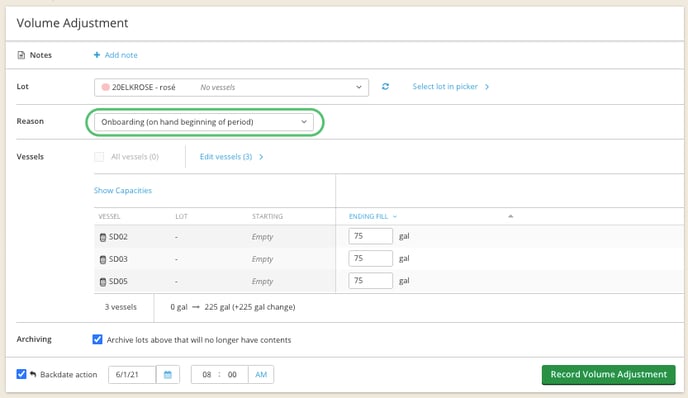
- Click the blue “Select Vessels” link to slide over the Vessel Selector. Use the filters as needed to find the correct vessels to fill.
- Once all the vessels are moved to the Selected Vessels window on the right, in the lower right click the "Select Vessels" button to bring them back to the Volume Adjustment screen.
- Set the ending contents of each of the vessels chosen based on what you want the final contents to be. You can fill each vessel to capacity, set the contents to be applied across all chosen vessels using the "Apply" button, or manually enter each vessel's contents.
- If you want to backdate this action to set the contents as of a date in the past, click the "Backdate Action" button and select the desired date. *This will be the date when the contents will populate on Page I, Part 1, Section A, Row 1: "On hand beginning of period" for TTB 5120.17 reporting if declared in an alcohol tax class.*
- Add a note if desired and press the  button.
**TIP**: A good way to capture historical data is to attach these documents/photos as a [note](https://innovint-6865708.hs-sites.com/hc/en-us/articles/360009672091-how-to-add-a-photo-note?hsLang=en) on the lot details page.
Once you've completed this for all your lots, you're ready to start recording cellar activities and assigning work orders!
### Add volume to Case Goods lots
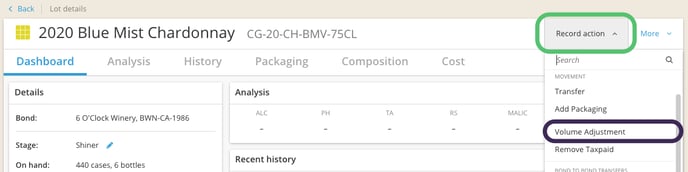
#### From the Lot Details page, click the “Record Action” drop down and select **Volume Adjustment**
****
- Your lot will auto-populate, or you can select a different lot using the blue “Select lot in picker” link to slide over the Lot Selector. Use the filters as needed to find the correct lot to fill.
- Reason: Onboarding (on hand beginning of period) - Use this option for new account setup, if you've recently activated the Case Goods Management feature, or for adjustments to your on hand volume. Any volume added with this reason will populate Part I, Section B, Line 1 of the TTB 5120.17 report. See our articles on [Volume Adjustments](https://support.innovint.us/hc/en-us/articles/204178489-volume-adjustment?hsLang=en) and/or [Bond to Bond transfers](https://support.innovint.us/hc/en-us/articles/360018542692-bond-to-bond-transfers?hsLang=en).
**Note:** Due to compliance implications, this is the ONLY time to select the reason of *Onboarding*. In the future, if you need to bring in additional wine please record a [B2B Transfer In](https://support.innovint.us/hc/en-us/articles/360018542692-bond-to-bond-transfers?hsLang=en#B2B).
#### 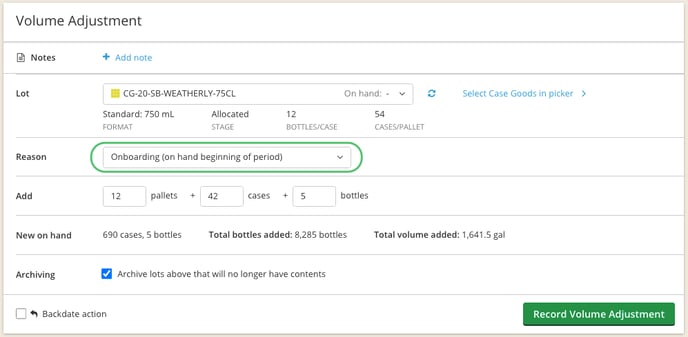
- Enter the number of pallets, cases, and individual bottles. InnoVint will calculate the new on hand amount, total bottles added, and total volume added.
- If you want to backdate this action to set the contents as of a date in the past, click the "Backdate Action" button and select the desired date. *This will be the date when the contents will populate on Page I, Part 1, Section B, Row 1: "On hand beginning of period" for TTB 5120.17 reporting if declared in an alcohol tax class.*
- Add a note if desired and press the  button.
Once you've completed this for all your lots, you're ready to start recording activities on your Case Goods lots.
### Congratulations! You've completed the 4 onboarding steps. 🎉
Other articles you may find helpful:
- [How to add other users](https://support.innovint.us/hc/en-us/how-to-add-or-remove-users?hsLang=en)
- [How to populate your dry goods inventory](https://support.innovint.us/hc/en-us/articles/115000825066-how-to-create-additives-and-additive-batches?hsLang=en)
- [How to import your current lab analysis](https://support.innovint.us/hc/en-us/articles/115002687291-how-to-import-analyses-via-csv?hsLang=en)
- [How to create analysis panels ](https://support.innovint.us/hc/en-us/articles/204504149-analysis-panels-how-to-create-save-and-delete?hsLang=en)
- [New to InnoVint](https://support.innovint.us/hc/en-us/new-to-innovint?hsLang=en#main-content)
- [Accessing InnoVint](https://support.innovint.us/hc/en-us/new-to-innovint?hsLang=en#accessing-innovint)
- [Settings - MAKE, GROW & FINANCE](https://support.innovint.us/hc/en-us/new-to-innovint?hsLang=en#settings-make-grow-finance)
- [Getting Started - MAKE, GROW & FINANCE](https://support.innovint.us/hc/en-us/new-to-innovint?hsLang=en#getting-started-make-grow-finance)
- [MAKE](https://support.innovint.us/hc/en-us/make?hsLang=en#main-content)
- [Dashboard & Calendar](https://support.innovint.us/hc/en-us/make?hsLang=en#dashboard-calendar)
- [Lots](https://support.innovint.us/hc/en-us/make?hsLang=en#lots)
- [Vessels](https://support.innovint.us/hc/en-us/make?hsLang=en#vessels)
- [Work Orders](https://support.innovint.us/hc/en-us/make?hsLang=en#work-orders)
- [Recording Actions](https://support.innovint.us/hc/en-us/make?hsLang=en#recording-actions)
- [Movement Actions](https://support.innovint.us/hc/en-us/make?hsLang=en#movement-actions)
- [Topping](https://support.innovint.us/hc/en-us/make?hsLang=en#topping)
- [Analysis](https://support.innovint.us/hc/en-us/make?hsLang=en#analysis)
- [Analysis Reports](https://support.innovint.us/hc/en-us/make?hsLang=en#analysis-reports)
- [Additions](https://support.innovint.us/hc/en-us/make?hsLang=en#additions)
- [Case Goods in MAKE](https://support.innovint.us/hc/en-us/make?hsLang=en#case-goods-in-make)
- [Dry Goods](https://support.innovint.us/hc/en-us/make?hsLang=en#dry-goods)
- [Vineyards](https://support.innovint.us/hc/en-us/make?hsLang=en#vineyards)
- [Reporting](https://support.innovint.us/hc/en-us/make?hsLang=en#reporting)
- [Compliance](https://support.innovint.us/hc/en-us/make?hsLang=en#compliance)
- [Tags & Notes](https://support.innovint.us/hc/en-us/make?hsLang=en#tags-notes)
- [Printing Labels from InnoVint](https://support.innovint.us/hc/en-us/make?hsLang=en#printing-labels-from-innovint)
- [AI](https://support.innovint.us/hc/en-us/make?hsLang=en#ai)
- [GROW](https://support.innovint.us/hc/en-us/grow?hsLang=en)
- [FINANCE](https://support.innovint.us/hc/en-us/finance?hsLang=en#main-content)
- [Getting Started](https://support.innovint.us/hc/en-us/finance?hsLang=en#getting-started)
- [Reporting](https://support.innovint.us/hc/en-us/finance?hsLang=en#reporting)
- [Guidance & FAQ](https://support.innovint.us/hc/en-us/finance?hsLang=en#guidance-faq)
- [Harvest](https://support.innovint.us/hc/en-us/harvest?hsLang=en#main-content)
- [Preparing for Harvest](https://support.innovint.us/hc/en-us/harvest?hsLang=en#preparing-for-harvest)
- [Vineyard Harvest Reports](https://support.innovint.us/hc/en-us/harvest?hsLang=en#vineyard-harvest-reports)
- [Harvest Workflow & Fermentation Tracking](https://support.innovint.us/hc/en-us/harvest?hsLang=en#harvest-workflow-fermentation-tracking)
- [Settings & Preferences](https://support.innovint.us/hc/en-us/harvest?hsLang=en#settings-preferences)
- [MAKE: Advanced Features](https://support.innovint.us/hc/en-us/make-advanced-features?hsLang=en#main-content)
- [Owner-based Permissions System](https://support.innovint.us/hc/en-us/make-advanced-features?hsLang=en#owner-based-permissions-system)
- [Custom Attributes](https://support.innovint.us/hc/en-us/make-advanced-features?hsLang=en#custom-attributes)
- [Blend Trials](https://support.innovint.us/hc/en-us/make-advanced-features?hsLang=en#blend-trials)
- [Tank Maps](https://support.innovint.us/hc/en-us/make-advanced-features?hsLang=en#tank-maps)
- [Sparkling Wine Module](https://support.innovint.us/hc/en-us/make-advanced-features?hsLang=en#sparkling-wine-module)
- [Intended Use](https://support.innovint.us/hc/en-us/make-advanced-features?hsLang=en#intended-use)
- [Integrations](https://support.innovint.us/hc/en-us/make-advanced-features?hsLang=en#integrations)
- [SUPPLY](https://support.innovint.us/hc/en-us/supply?hsLang=en#main-content)
- [Getting Started with SUPPLY](https://support.innovint.us/hc/en-us/supply?hsLang=en#getting-started-with-supply)
- [Actions in SUPPLY](https://support.innovint.us/hc/en-us/supply?hsLang=en#actions-in-supply)
- [Using SUPPLY](https://support.innovint.us/hc/en-us/supply?hsLang=en#using-supply)
- [Order Management](https://support.innovint.us/hc/en-us/supply?hsLang=en#order-management)
- [InnoApp](https://support.innovint.us/hc/en-us/innoapp?hsLang=en#main-content)
- [InnoApp](https://support.innovint.us/hc/en-us/innoapp?hsLang=en#innoapp)
- [InnoApp - Work Orders](https://support.innovint.us/hc/en-us/innoapp?hsLang=en#innoapp-work-orders)
- [Guidance & FAQs](https://support.innovint.us/hc/en-us/guidance-faqs?hsLang=en#main-content)
- [Frequently Asked Questions](https://support.innovint.us/hc/en-us/guidance-faqs?hsLang=en#frequently-asked-questions)
- [Specialized Workflows](https://support.innovint.us/hc/en-us/guidance-faqs?hsLang=en#specialized-workflows)
- [Best Practices](https://support.innovint.us/hc/en-us/guidance-faqs?hsLang=en#best-practices)
- [Templates](https://support.innovint.us/hc/en-us/guidance-faqs?hsLang=en#templates)
- [InnoVint Academy](https://support.innovint.us/hc/en-us/innovint-academy?hsLang=en#main-content)
- [Video Trainings/Tutorials](https://support.innovint.us/hc/en-us/innovint-academy?hsLang=en#video-trainings-tutorials)
- [Video Informational Sessions](https://support.innovint.us/hc/en-us/innovint-academy?hsLang=en#video-informational-sessions)
- [Quick Video Tutorials](https://support.innovint.us/hc/en-us/innovint-academy?hsLang=en#quick-video-tutorials)
- [Product Updates](https://support.innovint.us/hc/en-us/product-updates?hsLang=en#main-content)
- [Product Updates: 2025-2026](https://support.innovint.us/hc/en-us/product-updates?hsLang=en#product-updates-2025-2026)
- [Product Updates: 2024](https://support.innovint.us/hc/en-us/product-updates?hsLang=en#product-updates-2024)
- [Product Updates: 2023](https://support.innovint.us/hc/en-us/product-updates?hsLang=en#product-updates-2023)
- [Product Updates: 2017 - 2022](https://support.innovint.us/hc/en-us/product-updates?hsLang=en#product-updates-2017-2022)
- [Support Hours & FAQs](https://support.innovint.us/hc/en-us/support-hours-faqs?hsLang=en)
[](https://support.innovint.us/hc/en-us?hsLang=en)
Copyright © 2025, InnoVint