---
title: "3/31/2026 Product Updates: MAKE & SUPPLY"
description: Product updates from the last quarter including SUPPLY, MAKE, FINANCE and InnoApp
---
[Skip to content](https://support.innovint.us/hc/en-us/3/31/2026-product-updates-make-and-supply#main-content)
[Submit a help ticket](https://support.innovint.us/hc/en-us/kb-tickets/new?hsLang=en)
![InnoVintSupportCenter - header.png\]](https://support.innovint.us/hs-fs/hubfs/InnoVintSupportCenter%20-%20header.png?width=300&height=22&name=InnoVintSupportCenter%20-%20header.png)
Open main navigation
Close main navigation
- [Submit a help ticket](https://support.innovint.us/hc/en-us/kb-tickets/new)
How can we help you today?
- There are no suggestions because the search field is empty.
1. [Support Center](https://support.innovint.us/hc/en-us?hsLang=en)
2. [Product Updates](https://support.innovint.us/hc/en-us/product-updates?hsLang=en)
3. [Product Updates: 2025-2026](https://support.innovint.us/hc/en-us/product-updates?hsLang=en#product-updates-2025-2026)
# 3/31/2026 Product Updates: MAKE & SUPPLY
## MAKE gets a new Lot Explorer & Custom Lot Attributes, InnoApp work order improvements, and the SUPPLY-C7 integration is even better!
### MAKE
#### New Lot Explorer
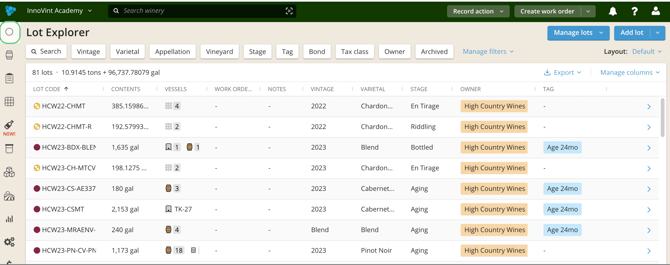
We've updated the original Lot Explorer to do more and support you better. It now has a fresh look and more powerful functionality. Our goal was to make the table easier to scan, reduce visual clutter, and enable more personalized workflows when working with your lots.
- Choose exactly which columns appear, reorder them, resize them, and pin important columns to the left
- Control which filters appear in the explorer, and their default settings
- Each user can save multiple table layouts so you don’t have to reconfigure columns and filters
Get the nitty gritty in [this article](https://support.innovint.us/hc/en-us/lot-explorer?hsLang=en).
#### Custom Lot Attributes
Custom Lot Attributes allow you to create and manage new custom data fields on your juice/wine lots while also being able to reference these attributes within the Lot details page, Lot Explorer, Custom Reports & more locations. This enables you to incorporate your unique attributes directly into workflows and reporting. Find out more [here](https://support.innovint.us/hc/en-us/custom-attributes-lots?hsLang=en)!
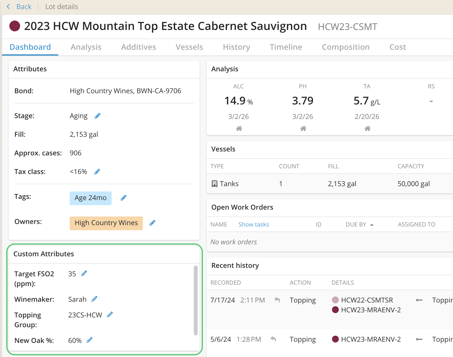
Custom Lot Attributes are available for MAKE Plus subscriptions only.
#### Appellation Rollup improvements!
Not bottling a vineyard designate? Our [Appellation Rollup](https://support.innovint.us/hc/en-us/appellation-roll-up?hsLang=en) now includes all California, Oregon and Washington State appellations so you can see the aggregated lot composition across smaller but overlapping geographic groupings! InnoVint will now show the total percentage that "rolls up" - into a larger appellation.

#### Analysis Import Changes
- Our "Modified" template now supports the same date/time format as the "Original" template, better supporting you when recording analyses performed at different times in the same day. Time stamps are supported in DD/MM/YY 00:00 format (24 hr time).

- Analysis Import (regular and AI) now allows you to edit or entirely remove lots & vessels after uploading a file for analysis.
#### More options for easier use!
- For metric accounts
- We've added two more metric addition rates: ml/tonne and g/tonne
- We now fully support our [Transfer Volume to Weight action](https://support.innovint.us/hc/en-us/transfer-volume-to-weight?hsLang=en) for metric units (Bleed/Saignee actions also now update your expected yield properly!)
- Looking for something? We've made it easier to filter for your received fruit in the Fruit Intake Report - date filters are now available!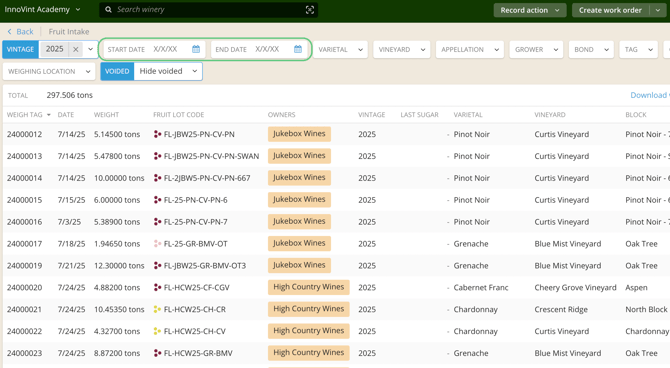
- **Transfer (Inter-facility)** has been renamed **B2B Transfer (Inter-facility)** to help clarify the intended and best function of this action. Learn more about [it here!](https://support.innovint.us/hc/en-us/bond-to-bond-b2b?hsLang=en)
### FINANCE
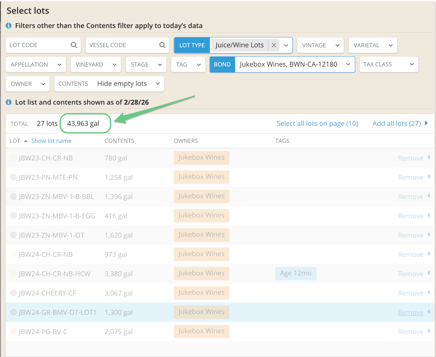
We added the lot volume total to the cost item action lot picker, and the bottom of the lot list! You need to know that you are spreading cost across the right volume. You can now see the total gallons of lots selected in the Lot Picker, and when reviewing your added costs, letting you know if you have the right lots selected or if you are reconciling against the wrong volume/lots.
### InnoApp
- It's always harvest for someone! We've added support for the [Transfer Volume to Weight](https://support.innovint.us/hc/en-us/transfer-volume-to-weight?hsLang=en) task to InnoApp.
- More quality control:
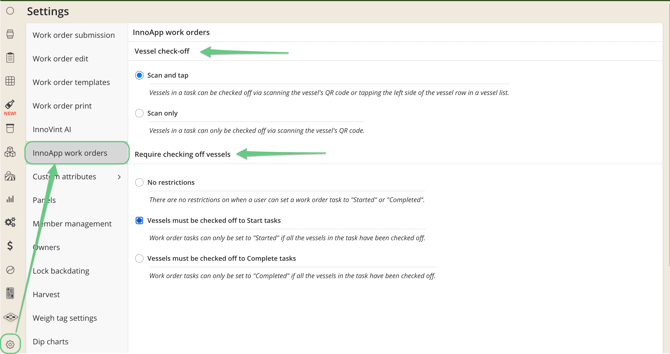
- You can now **require** that vessels are checked off in InnoApp prior to starting work order tasks, or prior to work order task completion.
- You can require that vessels are scanned to check off (if you have our QR codes) or leave the option to tap or scan.
Find these settings in your desktop app Settings / InnoApp work orders. Learn more [here](https://support.innovint.us/hc/en-us/wo-overview#settings)!
### SUPPLY
#### More flexibility!
You can now Archive or Unarchive SKUs, and even delete them! Find out when you can delete, and when you can archive [in this article](https://support.innovint.us/hc/en-us/how-to-archive-or-delete-skus?hsLang=en).
#### Increased functionality for the Commerce7 integration
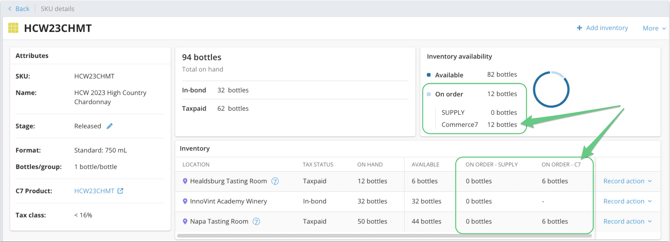
- SUPPLY now displays the quantity of your C7 SKU's allocated inventory.

You'll see this called out and rolled up into your SKU's Inventory Availability widget, and visible in all of the other "on order" columns in your explorers and pickers.
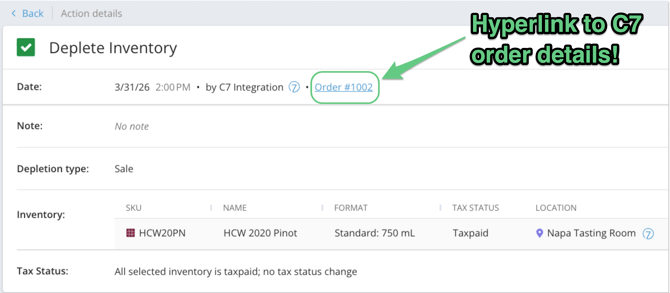
- We now have C7 Order number visibility in SUPPLY! Orders fulfilled in Commerce7 will now surface their C7 order number on the corresponding SUPPLY Depletion action. This order number will be visible for all synched transactions following the release:it is not retroactive. Click onto the order number to link directly to the order in Commerce7!
- Commerce7 inventory locations can now link to SUPPLY "in-bond" locations. For in-bond inventory, depending on the transaction type that occurs in C7, you may need to manually update the compliance reason on the action that is generated in SUPPLY.
- [New to InnoVint](https://support.innovint.us/hc/en-us/new-to-innovint?hsLang=en#main-content)
- [Accessing InnoVint](https://support.innovint.us/hc/en-us/new-to-innovint?hsLang=en#accessing-innovint)
- [Settings - MAKE, GROW & FINANCE](https://support.innovint.us/hc/en-us/new-to-innovint?hsLang=en#settings-make-grow-finance)
- [Getting Started - MAKE, GROW & FINANCE](https://support.innovint.us/hc/en-us/new-to-innovint?hsLang=en#getting-started-make-grow-finance)
- [MAKE](https://support.innovint.us/hc/en-us/make?hsLang=en#main-content)
- [Dashboard & Calendar](https://support.innovint.us/hc/en-us/make?hsLang=en#dashboard-calendar)
- [Lots](https://support.innovint.us/hc/en-us/make?hsLang=en#lots)
- [Vessels](https://support.innovint.us/hc/en-us/make?hsLang=en#vessels)
- [Work Orders](https://support.innovint.us/hc/en-us/make?hsLang=en#work-orders)
- [Recording Actions](https://support.innovint.us/hc/en-us/make?hsLang=en#recording-actions)
- [Movement Actions](https://support.innovint.us/hc/en-us/make?hsLang=en#movement-actions)
- [Topping](https://support.innovint.us/hc/en-us/make?hsLang=en#topping)
- [Analysis](https://support.innovint.us/hc/en-us/make?hsLang=en#analysis)
- [Analysis Reports](https://support.innovint.us/hc/en-us/make?hsLang=en#analysis-reports)
- [Additions](https://support.innovint.us/hc/en-us/make?hsLang=en#additions)
- [Case Goods in MAKE](https://support.innovint.us/hc/en-us/make?hsLang=en#case-goods-in-make)
- [Dry Goods](https://support.innovint.us/hc/en-us/make?hsLang=en#dry-goods)
- [Vineyards](https://support.innovint.us/hc/en-us/make?hsLang=en#vineyards)
- [Reporting](https://support.innovint.us/hc/en-us/make?hsLang=en#reporting)
- [Compliance](https://support.innovint.us/hc/en-us/make?hsLang=en#compliance)
- [Tags & Notes](https://support.innovint.us/hc/en-us/make?hsLang=en#tags-notes)
- [Printing Labels from InnoVint](https://support.innovint.us/hc/en-us/make?hsLang=en#printing-labels-from-innovint)
- [AI](https://support.innovint.us/hc/en-us/make?hsLang=en#ai)
- [GROW](https://support.innovint.us/hc/en-us/grow?hsLang=en)
- [FINANCE](https://support.innovint.us/hc/en-us/finance?hsLang=en#main-content)
- [Getting Started](https://support.innovint.us/hc/en-us/finance?hsLang=en#getting-started)
- [Reporting](https://support.innovint.us/hc/en-us/finance?hsLang=en#reporting)
- [Guidance & FAQ](https://support.innovint.us/hc/en-us/finance?hsLang=en#guidance-faq)
- [Harvest](https://support.innovint.us/hc/en-us/harvest?hsLang=en#main-content)
- [Preparing for Harvest](https://support.innovint.us/hc/en-us/harvest?hsLang=en#preparing-for-harvest)
- [Vineyard Harvest Reports](https://support.innovint.us/hc/en-us/harvest?hsLang=en#vineyard-harvest-reports)
- [Harvest Workflow & Fermentation Tracking](https://support.innovint.us/hc/en-us/harvest?hsLang=en#harvest-workflow-fermentation-tracking)
- [Settings & Preferences](https://support.innovint.us/hc/en-us/harvest?hsLang=en#settings-preferences)
- [MAKE: Advanced Features](https://support.innovint.us/hc/en-us/make-advanced-features?hsLang=en#main-content)
- [Owner-based Permissions System](https://support.innovint.us/hc/en-us/make-advanced-features?hsLang=en#owner-based-permissions-system)
- [Custom Attributes](https://support.innovint.us/hc/en-us/make-advanced-features?hsLang=en#custom-attributes)
- [Blend Trials](https://support.innovint.us/hc/en-us/make-advanced-features?hsLang=en#blend-trials)
- [Tank Maps](https://support.innovint.us/hc/en-us/make-advanced-features?hsLang=en#tank-maps)
- [Sparkling Wine Module](https://support.innovint.us/hc/en-us/make-advanced-features?hsLang=en#sparkling-wine-module)
- [Intended Use](https://support.innovint.us/hc/en-us/make-advanced-features?hsLang=en#intended-use)
- [Integrations](https://support.innovint.us/hc/en-us/make-advanced-features?hsLang=en#integrations)
- [SUPPLY](https://support.innovint.us/hc/en-us/supply?hsLang=en#main-content)
- [Getting Started with SUPPLY](https://support.innovint.us/hc/en-us/supply?hsLang=en#getting-started-with-supply)
- [Actions in SUPPLY](https://support.innovint.us/hc/en-us/supply?hsLang=en#actions-in-supply)
- [Using SUPPLY](https://support.innovint.us/hc/en-us/supply?hsLang=en#using-supply)
- [Order Management](https://support.innovint.us/hc/en-us/supply?hsLang=en#order-management)
- [InnoApp](https://support.innovint.us/hc/en-us/innoapp?hsLang=en#main-content)
- [InnoApp](https://support.innovint.us/hc/en-us/innoapp?hsLang=en#innoapp)
- [InnoApp - Work Orders](https://support.innovint.us/hc/en-us/innoapp?hsLang=en#innoapp-work-orders)
- [Guidance & FAQs](https://support.innovint.us/hc/en-us/guidance-faqs?hsLang=en#main-content)
- [Frequently Asked Questions](https://support.innovint.us/hc/en-us/guidance-faqs?hsLang=en#frequently-asked-questions)
- [Specialized Workflows](https://support.innovint.us/hc/en-us/guidance-faqs?hsLang=en#specialized-workflows)
- [Best Practices](https://support.innovint.us/hc/en-us/guidance-faqs?hsLang=en#best-practices)
- [Templates](https://support.innovint.us/hc/en-us/guidance-faqs?hsLang=en#templates)
- [InnoVint Academy](https://support.innovint.us/hc/en-us/innovint-academy?hsLang=en#main-content)
- [Video Trainings/Tutorials](https://support.innovint.us/hc/en-us/innovint-academy?hsLang=en#video-trainings-tutorials)
- [Video Informational Sessions](https://support.innovint.us/hc/en-us/innovint-academy?hsLang=en#video-informational-sessions)
- [Quick Video Tutorials](https://support.innovint.us/hc/en-us/innovint-academy?hsLang=en#quick-video-tutorials)
- [Product Updates](https://support.innovint.us/hc/en-us/product-updates?hsLang=en#main-content)
- [Product Updates: 2025-2026](https://support.innovint.us/hc/en-us/product-updates?hsLang=en#product-updates-2025-2026)
- [Product Updates: 2024](https://support.innovint.us/hc/en-us/product-updates?hsLang=en#product-updates-2024)
- [Product Updates: 2023](https://support.innovint.us/hc/en-us/product-updates?hsLang=en#product-updates-2023)
- [Product Updates: 2017 - 2022](https://support.innovint.us/hc/en-us/product-updates?hsLang=en#product-updates-2017-2022)
- [Support Hours & FAQs](https://support.innovint.us/hc/en-us/support-hours-faqs?hsLang=en)
[](https://support.innovint.us/hc/en-us?hsLang=en)
Copyright © 2025, InnoVint